
The ESP32-S3-EYE v2.2 stands as a premier AIoT development platform, specifically designed to leverage the powerful ESP32-S3 SoC for advanced image recognition and audio processing. This board is more than a simple microcontroller implementation; it is a specialized tool engineered for neural network computation, facial recognition, and complex signal processing. For engineers building on this platform, understanding the ESP32-S3-EYE Pinout is the critical first step toward ensuring successful hardware integration, sensor communication, and system stability.
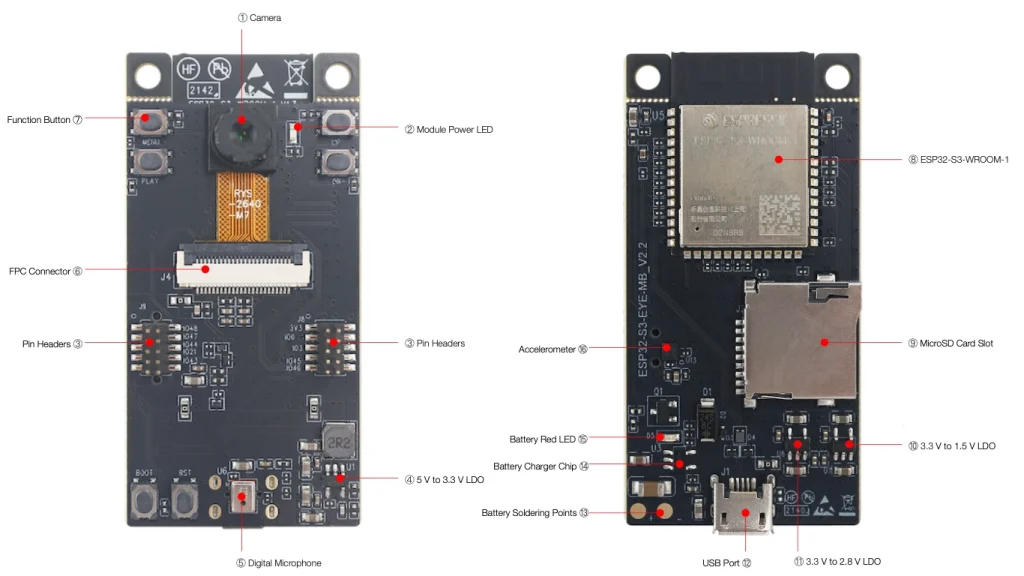
At the architectural core, the board features the ESP32-S3-WROOM-1 module, paired with 8 MB of Octal PSRAM and 8 MB of Flash memory. This robust memory configuration supports high-resolution imaging and complex software stacks, such as ESP-WHO. Because nearly every GPIO on the module is pre-assigned to control onboard peripherals like the 2-megapixel OV2640 camera, the microphone, and the LCD display, developers must have a precise grasp of the ESP32-S3-EYE Pinout to avoid hardware conflicts during custom development.
1. Hardware Architecture and Exploring the ESP32-S3-EYE Pinout
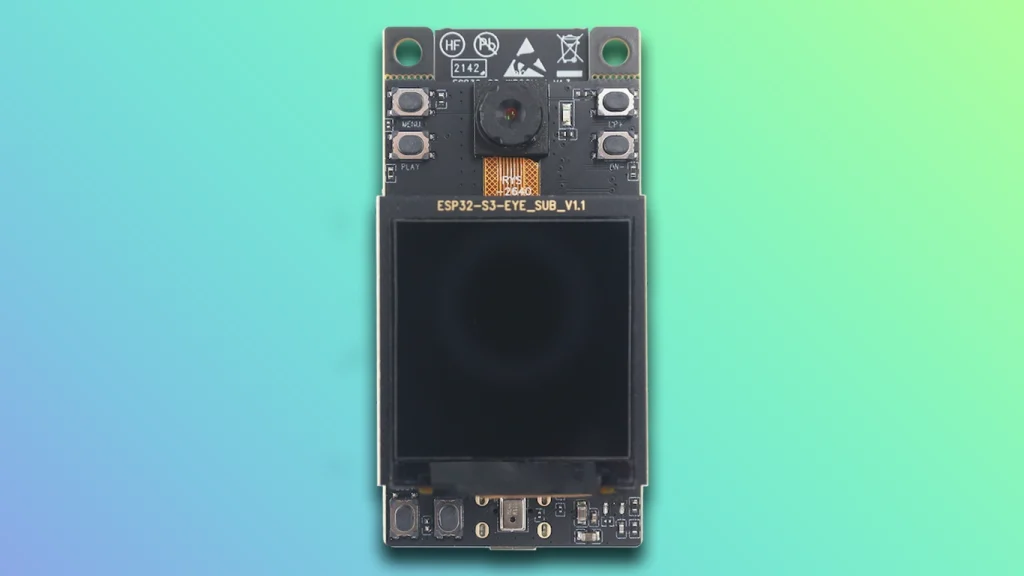
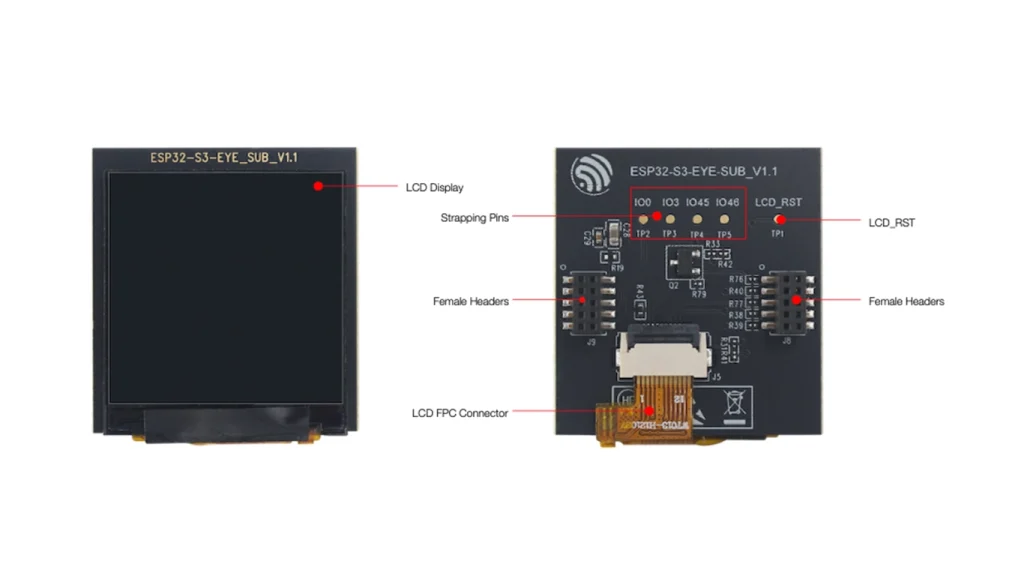
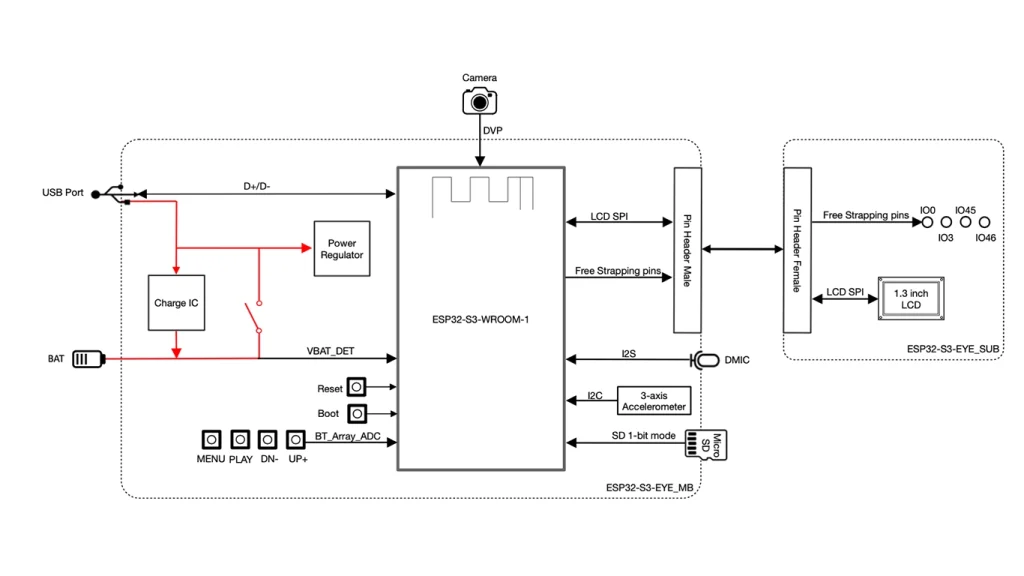
The ESP32-S3-EYE v2.2 utilizes a modular design, separating the main board (MB) from the sub-board (SUB). This separation is vital for signal integrity, as it isolates the high-speed data lines for the LCD and camera interface from the power regulation components on the main board. When examining the ESP32-S3-EYE Pinout, one must account for this layout. The main board serves as the power hub and processing engine, while the sub-board acts as the primary visual and sensory interface.
Beyond the primary processing unit, the board includes a 3-axis accelerometer, which relies on the I2C bus. Integrating custom external sensors requires checking which pins are available, as the ESP32-S3-EYE Pinout shows that most usable lines are already tied to existing sensors or display drivers. Always cross-reference your peripheral requirements with the board’s default schematic to ensure that external devices do not interfere with the native hardware components.
2. Power Options and Thermal Management
Stable power delivery is essential for the reliability of AIoT applications. The board is powered via a Micro-USB interface, which supplies the necessary 5V. Internally, the board uses a series of Low-Dropout (LDO) regulators to convert this input into the 3.3V, 2.8V, and 1.5V rails required by the SoC, the camera module, and the various logic gates. This multi-rail power system is critical for minimizing electrical noise, which can otherwise cause artifacts in video streams or audible distortions in audio recordings.
WARNING: Simultaneous Power Usage
If you are using an external Li-ion battery, ensure it is equipped with a built-in protection circuit. Never attempt to power the board through the USB port while the Li-ion battery is connected without verifying that the charging circuit is in a safe state, as improper handling can lead to thermal stress or hardware damage.
Thermal management also plays a role in the design. The LDO regulators dissipate power as heat, and in closed-case deployments, this heat can impact system performance. When analyzing the ESP32-S3-EYE Pinout in the context of system integration, consider airflow requirements to keep the SoC within its optimal operating temperature, especially when running heavy neural network inference tasks that load the CPU and accelerate power consumption.
3. Technical Deep Dive: ADC, UART, and Strapping Pins
The board’s functionality is built on the ESP32-S3’s sophisticated internal logic. The SAR ADC (Successive Approximation Register) facilitates the conversion of analog sensor inputs into digital data. Because the ADC uses the internal VDD as a reference, stable power is paramount for measurement accuracy. If your application relies on analog sensor feedback, ensure that your power rails are properly decoupled to maintain the precision of the 12-bit conversion.
Programming and communication are handled by the chip’s native USB Serial/JTAG controller, which streamlines the development process by removing the need for external bridge chips. This direct link allows for faster firmware flashing and debugging. Synchronization is maintained through the SoC’s hardware, but software developers must ensure correct CDC driver configuration to maintain stable serial communication.
Finally, the ESP32-S3-EYE Pinout is governed by strapping pin logic. Pins such as IO0, IO45, and IO46 are sampled during the boot process to determine whether the device enters normal execution mode or the firmware download mode. Any unexpected signal fluctuation on these pins during reset can lead to a failure to boot. Understanding these strapping conditions is crucial for any user attempting to modify the board’s hardware or interface it with custom peripherals.
4. ESP32-S3-EYE Pinout Reference Table
The following table provides a detailed breakdown of the board’s pin functions. Every pin is dedicated to a specific task to optimize the board for its AI and imaging functions.
| Pin # | Name | Type | Function |
|---|---|---|---|
| 1 | IO0 | I/O | Strapping Pin (Boot Mode) |
| 2 | IO3 | I/O | Module Power LED Control |
| 3 | IO19 | I/O | USB D- |
| 4 | IO20 | I/O | USB D+ |
| 5 | IO45 | I/O | Strapping Pin |
| 6 | IO46 | I/O | Strapping Pin |
| 7 | I2S_DATA | I/O | Digital Mic Data |
| 8 | I2S_CLK | I/O | Digital Mic Clock |
| 9 | I2S_WS | I/O | Digital Mic Word Select |
| 10 | DVP_PCLK | I/O | Camera Pixel Clock |
| 11 | DVP_VSYNC | I/O | Camera VSYNC |
| 12 | SPI_MOSI | I/O | LCD/SD SPI Data |
| 13 | SPI_MISO | I/O | LCD/SD SPI Data |
| 14 | SPI_CLK | I/O | LCD/SD SPI Clock |
| 15 | SPI_CS | I/O | LCD/SD Chip Select |
5. Programming and Firmware Download Mode
To flash new firmware, you must place the device into «Download Mode». This involves holding the BOOT button, pressing and releasing the RST button, and then releasing the BOOT button. The ESP32-S3’s bootloader then listens for incoming binary data over the USB connection. By using the ESP-WHO framework, developers can easily compile and upload applications that utilize the camera and microphone interfaces. Proper setup ensures the hardware transitions seamlessly from development to deployment.
6. Conclusion
Mastering the ESP32-S3-EYE Pinout is the key to unlocking the full potential of this powerful AIoT platform. From understanding the nuances of the integrated LDOs to the strict timing requirements of the camera and display interfaces, the board demands a high degree of technical precision. Whether you are creating advanced surveillance systems or novel AI-driven audio applications, the insights provided here will help you navigate the hardware constraints and build professional-grade solutions with confidence.
7. References & Legal Notice
This technical manual is developed based on the official documentation provided by Espressif Systems. We highly recommend referring to the primary source for the most recent updates regarding hardware revisions and detailed specifications.
Disclaimer: ESP32 and ESP32-S2 are registered trademarks of Espressif Systems (Shanghai) Co., Ltd. This guide is an independent technical review and is not an official publication of Espressif Systems.