

Upgrade your DIY console: bring your game to life with sound effects and save your best results in the ESP32 memory.
What’s New in Version v1.3?
The main goal of this update is unpredictability. Now, players can’t just memorize the rhythm; they must react to the situation in real-time.
Wiring Diagram
A quick reminder of the pinout. For sound effects, make sure to use a passive buzzer.
Important: A 100–220 Ohm resistor between GPIO 25 and the positive (+) terminal of the buzzer is required to limit the current and avoid overloading the ESP32 port.
Buzzer Type: The code uses the tone() function, so a passive buzzer is best (it allows you to change the pitch). An active buzzer will only beep at a single fixed note.
| Component | Pin (Display/Button) | ESP32 Pin (GPIO) | Description |
|---|---|---|---|
| OLED Display | VCC | 3.3V | Power Supply |
| OLED Display | GND | GND | Common Ground |
| OLED Display | SCL | GPIO 22 | I2C Clock Line |
| OLED Display | SDA | GPIO 21 | I2C Data Line |
| Button | Pin 1 | GPIO 15 | Jump Signal |
| Button | Pin 2 | GND | Ground Connection |
| Buzzer | Via 100 Ohm resistor | GPIO 25 | Audio Signal Output |
| Buzzer | Negative (-) | GND | Common Ground |
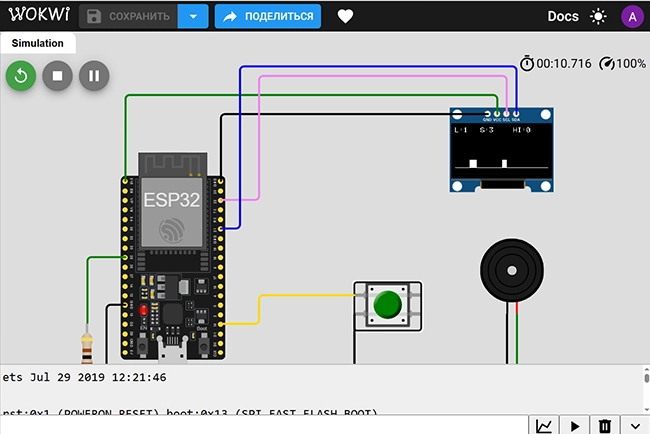
Wokwi Simulation: Testing Without Hardware
Before picking up a soldering iron, I recommend testing everything in an online simulator. This saves time on debugging.
Try the game in your browser:
Key Mechanics Breakdown (v1.3)
True Randomness
To ensure the random() function produces different values every time you power on the device, we initialize it using noise from an unused analog pin:
randomSeed(analogRead(0));Level-Based Spawn Logic
We have implemented a reduction of the «wait window» as the level increases. This creates the feeling that more obstacles are appearing:
int maxSpawnDelay = (level >= 2) ? 40 : 90;
obstacleX = 128 + random(0, maxSpawnDelay);
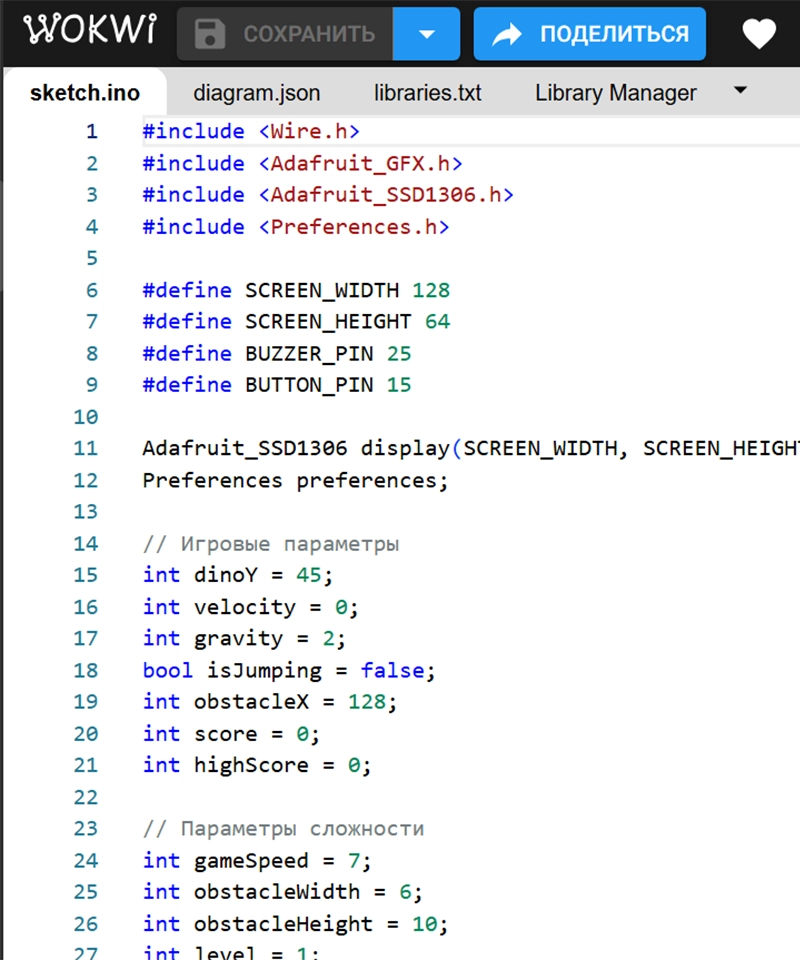
Full Source Code: ESP32 Dino Run v1.3 (by AndiBond)
Copy and paste this code into your Arduino IDE.
#include <Wire.h>
#include <Adafruit_GFX.h>
#include <Adafruit_SSD1306.h>
#include <Preferences.h>

#define SCREEN_WIDTH 128
#define SCREEN_HEIGHT 64
#define BUZZER_PIN 25
#define BUTTON_PIN 15

Adafruit_SSD1306 display(SCREEN_WIDTH, SCREEN_HEIGHT, &Wire, -1);
Preferences preferences;

// Game Parameters
int dinoY = 45;
int velocity = 0;
int gravity = 2;
bool isJumping = false;
int obstacleX = 128;
int score = 0;
int highScore = 0;

// Difficulty Parameters
int gameSpeed = 7;
int obstacleWidth = 6;
int obstacleHeight = 10;
int level = 1;
bool inverted = false;

// Function Prototypes
void showStartScreen();
void handleGameOver();
void drawGame();
void playSound(int freq, int duration);

void setup() {
  pinMode(BUTTON_PIN, INPUT_PULLUP);
  pinMode(BUZZER_PIN, OUTPUT);
  randomSeed(analogRead(0)); // Initialize randomness

  if(!display.begin(SSD1306_SWITCHCAPVCC, 0x3C)) {
    for(;;);
  }

  preferences.begin("dino-game", false);
  highScore = preferences.getInt("highscore", 0);

  showStartScreen();
}

void playSound(int freq, int duration) {
  tone(BUZZER_PIN, freq, duration);
}

void loop() {
  // 1. INPUT
  if (digitalRead(BUTTON_PIN) == LOW && !isJumping) {
    velocity = -12;
    isJumping = true;
    playSound(600, 80);
  }

  // 2. PHYSICS
  if (isJumping) {
    dinoY += velocity;
    velocity += gravity;
    if (dinoY >= 45) {
      dinoY = 45;
      isJumping = false;
    }
  }

  // LEVEL LOGIC
  level = (score / 10) + 1;
  gameSpeed = 6 + level;

  // Inversion at Level 3 (30 points)
  if (level >= 3 && !inverted) {
    inverted = true;
    display.invertDisplay(true);
    playSound(400, 200); delay(100); playSound(800, 200);
  }

  obstacleX -= gameSpeed;

  // Obstacle Spawning
  if (obstacleX < -20) {
    score++;

    // Random distance: denser at level 2+
    int maxSpawnDelay = (level >= 2) ? 40 : 90;
    obstacleX = 128 + random(0, maxSpawnDelay);

    // Random height
    obstacleHeight = random(8, 16);

    if (score % 10 == 0) playSound(1200, 50);
  }

  // Collision Check
  if (obstacleX > 15 && obstacleX < 25 && dinoY > (55 - obstacleHeight)) {
    handleGameOver();
  }

  drawGame();
  delay(30);
}

void showStartScreen() {
  inverted = false;
  display.invertDisplay(false);
  display.clearDisplay();
  display.setTextColor(WHITE);
  display.setTextSize(1);
  display.setCursor(25, 5);
  display.print("DINO RUN ESP32");
  display.setCursor(18, 18);
  display.print("v1.3 by AndiBond");
  display.setCursor(28, 38);
  display.print("HI-SCORE: ");
  display.print(highScore);
  display.setCursor(20, 54);
  display.print("Press to Start");
  display.display();

  while(digitalRead(BUTTON_PIN) == HIGH) { delay(10); }
  playSound(800, 100);
  delay(200);
}

void handleGameOver() {
  playSound(150, 600);
  if (score > highScore) {
    highScore = score;
    preferences.putInt("highscore", highScore);
  }

  display.clearDisplay();
  display.setCursor(10, 10);
  display.setTextSize(2);
  display.print("GAME OVER");
  display.setTextSize(1);
  display.setCursor(15, 35);
  display.print("Score: "); display.print(score);
  display.print("  Lv: "); display.print(level);
  display.setCursor(30, 50);
  display.print("HI-Score: "); display.print(highScore);
  display.setCursor(30, 57);
  display.print("andibond.com");
  display.display();

  delay(2500);
  score = 0;
  obstacleX = 128;
  dinoY = 45;
  showStartScreen();
}

void drawGame() {
  display.clearDisplay();
  display.setTextSize(1);
  display.setCursor(0, 0);
  display.print("L:"); display.print(level);
  display.setCursor(35, 0);
  display.print("S:"); display.print(score);
  display.setCursor(80, 0);
  display.print("HI:"); display.print(highScore);

  display.drawLine(0, 55, 128, 55, WHITE);
  display.fillRect(20, dinoY, 10, 10, WHITE);
  display.fillRect(obstacleX, 55 - obstacleHeight, obstacleWidth, obstacleHeight, WHITE);

  display.display();
}
AndiBond.com
Conclusion
We have come a long way from drawing a single dot on the screen to creating a fully functional game with:
- Jump physics and gravity.
- A high score system in Non-Volatile Storage (NVS).
- Sound feedback.
- Random level generation.
Project v1.3 by AndiBond is a great foundation for your own modifications. Try adding flying bird enemies or speed-up power-ups!
Share your high scores in the comments and subscribe to stay tuned for new DIY guides!
Missed the previous parts?
Support the AndiBond Project
Creating high-quality guides, finding working solutions, and debugging code takes a lot of time. All my projects remain open-source and free so that everyone can enter the world of electronics with the lowest possible barrier to entry.
If this tutorial saved you time or helped you launch your first game on ESP32, you can support the blog’s development. Your support helps me buy new sensors, displays, and controllers for future reviews.
Every donation is fuel for new articles and videos. Thank you for being with me!