

Developing embedded games on the ESP32 platform using OLED displays is an excellent way to master the fundamentals of computer graphics, physics, and code optimization. In this article, we’ll dive into the key changes introduced in the latest version of Dino Run (v1.9.5).
This version transforms the project from a basic clone into a dynamic arcade game with improved visuals and refined mechanics.
Missed the previous parts?
🛡️ Health & «Mercy» System
In early versions, the game was merciless: any contact with a cactus meant an instant Game Over.
Here’s how we changed that:
Survival System (Health Points)
2. Item Economy: Heart Mechanics
Instead of just points, we’ve introduced a bonus collection system:
🌵 Dynamic Obstacles: Multi-Height Gameplay
The most significant mechanical shift is moving away from a static obstacle line.
Variable Y-Axis Spawning
Starting from Level 2, cacti are no longer just ground-based. They spawn at three different altitudes:
🎨 Graphics Redesign & UI Improvements
We’ve moved toward «pixel-perfect» precision to maximize the small 128×64 screen:
💾 Memory & Performance Optimization
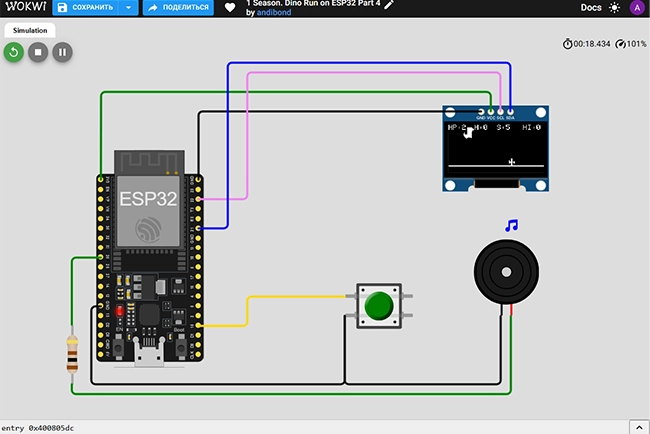
🕹️ Wokwi Simulation: Test Without Hardware
Before picking up your soldering iron, I recommend testing the code in an online simulator.
Try the Game in your Browser:
🛠️ Technical Stack & Pinout
Wiring Table
| Component | Pin (Display/Button) | ESP32 Pin (GPIO) | Description |
|---|---|---|---|
| OLED Display | VCC | 3.3V | Power Supply |
| OLED Display | GND | GND | Common Ground |
| OLED Display | SCL | GPIO 22 | I2C Clock Line |
| OLED Display | SDA | GPIO 21 | I2C Data Line |
| Button | Pin 1 | GPIO 15 | Jump Signal |
| Button | Pin 2 | GND | Ground Connection |
| Buzzer | Via 100 Ohm resistor | GPIO 25 | Audio Signal Output |
| Buzzer | Negative (-) | GND | Common Ground |
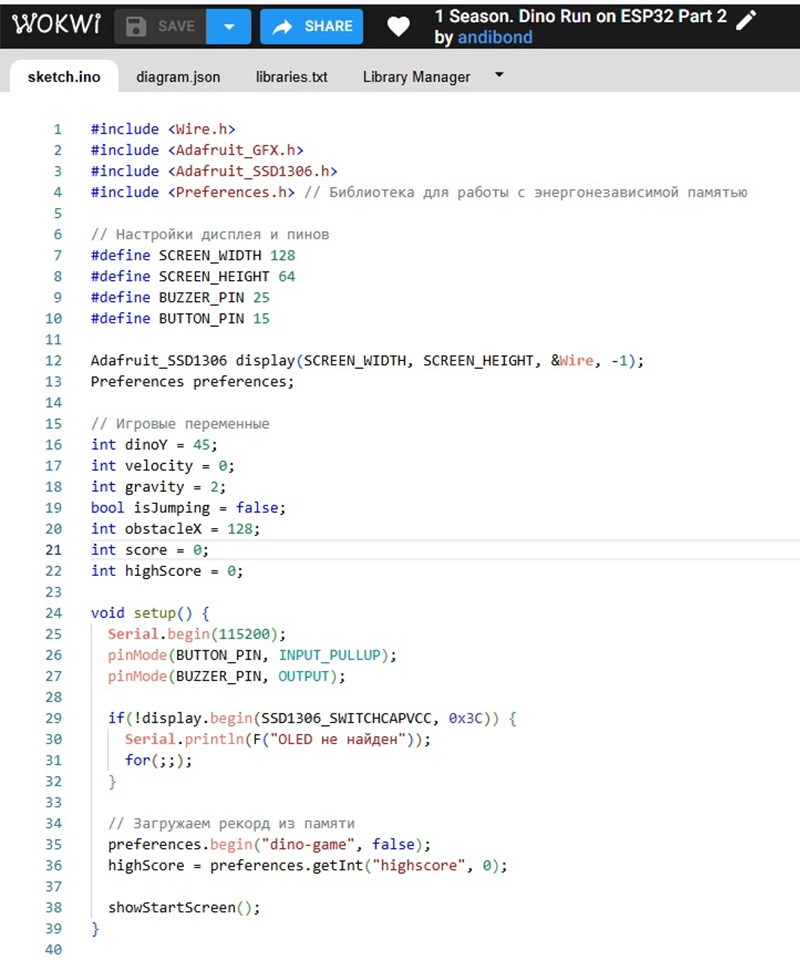
💻 The Source Code (v1.9.5)
#include <Wire.h>
#include <Adafruit_GFX.h>
#include <Adafruit_SSD1306.h>
#include <Preferences.h>

#define SCREEN_WIDTH 128
#define SCREEN_HEIGHT 64
#define BUZZER_PIN 25
#define BUTTON_PIN 15

// Project Data
const String version = "v1.9.5";
const String author = "AndiBond";

Adafruit_SSD1306 display(SCREEN_WIDTH, SCREEN_HEIGHT, &Wire, -1);
Preferences preferences;

// --- BITMAPS ---
const unsigned char dino_frame1[] PROGMEM = { 0x00, 0x00, 0x07, 0xf0, 0x07, 0xf8, 0x07, 0xfc, 0x07, 0xfc, 0x07, 0xf0, 0x07, 0xf0, 0x47, 0xe0, 0x47, 0xe0, 0xc7, 0xe0, 0xff, 0xe0, 0xff, 0xe0, 0x7f, 0xe0, 0x3f, 0xe0, 0x1c, 0x20, 0x18, 0x00 };
const unsigned char dino_frame2[] PROGMEM = { 0x00, 0x00, 0x07, 0xf0, 0x07, 0xf8, 0x07, 0xfc, 0x07, 0xfc, 0x07, 0xf0, 0x07, 0xf0, 0x47, 0xe0, 0x47, 0xe0, 0xc7, 0xe0, 0xff, 0xe0, 0xff, 0xe0, 0x7f, 0xe0, 0x3f, 0xe0, 0x08, 0x70, 0x00, 0x30 };
const unsigned char cactus_mini_bmp[] PROGMEM = { 0x18, 0x18, 0x18, 0x98, 0xdb, 0xff, 0xdb, 0x18, 0x18, 0x18 };
const unsigned char heart_bonus_bmp[] PROGMEM = { 0x66, 0xff, 0xff, 0xff, 0x7e, 0x3c, 0x18 };

// Game Variables
int dinoY = 39, velocity = 0, gravity = 2;
bool isJumping = false, legToggle = false;
int score = 0, highScore = 0, lives = 3;
unsigned long invincibilityUntil = 0;
int obstacleX = 128, obstacleY = 45;
int bonusX = -20, bonusY = 30, heartsCollected = 0;
int level = 1, gameSpeed = 7;

void setup() {
  pinMode(BUTTON_PIN, INPUT_PULLUP);
  pinMode(BUZZER_PIN, OUTPUT);
  randomSeed(analogRead(0));
  display.begin(SSD1306_SWITCHCAPVCC, 0x3C);
  preferences.begin("dino-game", false);
  highScore = preferences.getInt("highscore", 0);
  showStartScreen();
}

void loop() {
  if (digitalRead(BUTTON_PIN) == LOW && !isJumping) {
    velocity = -12; isJumping = true; tone(BUZZER_PIN, 600, 80);
  }
  if (isJumping) {
    dinoY += velocity; velocity += gravity;
    if (dinoY >= 39) { dinoY = 39; isJumping = false; }
  } else { legToggle = !legToggle; }

  level = (score / 10) + 1;
  gameSpeed = 6 + level;
  obstacleX -= gameSpeed;
  bonusX -= gameSpeed;

  if (obstacleX < -20) {
    score++;
    obstacleX = 128 + random(0, 40);
    if (level >= 2) {
      int r = random(0, 10);
      if (r < 3) obstacleY = 25; else if (r < 5) obstacleY = 35; else obstacleY = 45;
    } else { obstacleY = 45; }
    if (score % 5 == 0 && bonusX < -10) { bonusX = obstacleX + 60; bonusY = random(20, 40); }
  }

  if (bonusX > 15 && bonusX < 35 && dinoY < bonusY + 7 && dinoY + 16 > bonusY) {
    bonusX = -20; heartsCollected++; tone(BUZZER_PIN, 1500, 50);
    if (heartsCollected >= 5) { heartsCollected = 0; if (lives < 3) { lives++; tone(BUZZER_PIN, 2000, 150); } }
  }

  if (millis() > invincibilityUntil && obstacleX < 32 && obstacleX + 8 > 20) {
    if (dinoY < obstacleY + 10 && dinoY + 16 > obstacleY) {
      lives--; tone(BUZZER_PIN, 150, 300);
      invincibilityUntil = millis() + 1000; obstacleX = 140;
      if (lives <= 0) handleGameOver();
    }
  }
  drawGame();
  delay(35);
}

void drawGame() {
  display.clearDisplay();
  display.setTextColor(WHITE);
  display.setCursor(0, 0);  display.print("HP:"); display.print(lives);
  display.setCursor(35, 0); display.print("H:");  display.print(heartsCollected);
  display.setCursor(65, 0); display.print("S:");  display.print(score);
  display.setCursor(100,0); display.print("HI:"); display.print(highScore);
  display.drawLine(0, 55, 128, 55, WHITE);
  if (bonusX > -10) display.drawBitmap(bonusX, bonusY, heart_bonus_bmp, 8, 7, WHITE);
  if (millis() > invincibilityUntil || (millis() / 100) % 2 == 0) {
    display.drawBitmap(20, dinoY, (isJumping ? dino_frame1 : (legToggle ? dino_frame1 : dino_frame2)), 16, 16, WHITE);
  }
  display.drawBitmap(obstacleX, obstacleY, cactus_mini_bmp, 8, 10, WHITE);
  display.display();
}

void handleGameOver() {
  for(int i = 0; i < 10; i++) { display.setRotation(random(0, 4)); display.display(); delay(20); }
  display.setRotation(0);
  if (score > highScore) { highScore = score; preferences.putInt("highscore", score); }
  display.clearDisplay();
  display.setTextSize(2); display.setCursor(10, 10); display.print("GAME OVER");
  display.setTextSize(1); display.setCursor(25, 35); display.print("Score: "); display.print(score);
  display.setCursor(25, 45); display.print("Version: "); display.print(version);
  display.setCursor(25, 55); display.print("by "); display.print(author);
  display.display();
  delay(3000);
  lives = 3; score = 0; heartsCollected = 0; obstacleX = 128; dinoY = 39;
  showStartScreen();
}

void showStartScreen() {
  display.clearDisplay();
  display.setCursor(15, 10); display.print("DINO RUN "); display.print(version);
  display.setCursor(15, 25); display.print("Author: "); display.print(author);
  display.setCursor(15, 40); display.print("HI-SCORE: "); display.print(highScore);
  display.setCursor(15, 55); display.print("Press to Start");
  display.display();
  while(digitalRead(BUTTON_PIN) == HIGH) delay(10);
  tone(BUZZER_PIN, 800, 100); delay(200);
}
Conclusion
Version v1.9.5 turns a simple code demo into a balanced game with progressive difficulty. The combination of smaller hitboxes and verticality makes the gameplay more dynamic and professional.
AndiBond.com
Support the AndiBond Project
Creating high-quality guides, finding working solutions, and debugging code takes a lot of time. All my projects remain open-source and free so that everyone can enter the world of electronics with the lowest possible barrier to entry.
If this tutorial saved you time or helped you launch your first game on ESP32, you can support the blog’s development. Your support helps me buy new sensors, displays, and controllers for future reviews.
Every donation is fuel for new articles and videos. Thank you for being with me!