

The ESP32-S3-DevKitM-1 represents a streamlined, high-performance evolution for developers integrating AI-capable processing with robust wireless connectivity. By leveraging the ESP32-S3FN8 chip, this platform delivers 8 MB of internal flash memory in a compact form factor, making it ideal for space-constrained IoT deployments. Mastering the ESP32-S3-DevKitM-1 Pinout is essential for developers looking to optimize signal integrity, manage power domains effectively, and utilize the full suite of peripherals offered by the dual-core Xtensa processor.
1. Architecture and Core Integration
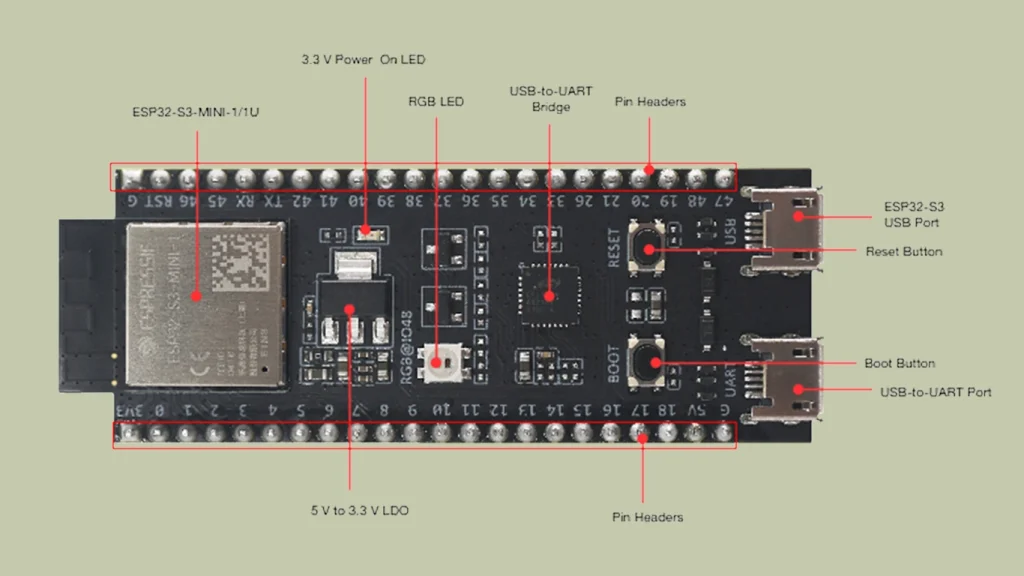
The board is built around the ESP32-S3-MINI-1/1U module, a versatile powerhouse capable of handling complex signal processing, neural network acceleration, and standard Wi-Fi/Bluetooth LE 5.0 protocols. Unlike larger legacy development kits, the ESP32-S3-DevKitM-1 prioritizes density. The architecture places the module at the heart of the design, with the vast majority of the SoC’s I/O pins broken out to two headers, J1 and J3. This physical layout requires a deep understanding of the signal multiplexing inherent in the ESP32-S3. Since the chip features a high pin-count I/O matrix, individual pins serve multiple functions—ranging from standard digital I/O and Analog-to-Digital Converter (ADC) channels to SPI and JTAG interfaces.
2. Power Options and Electrical Logic
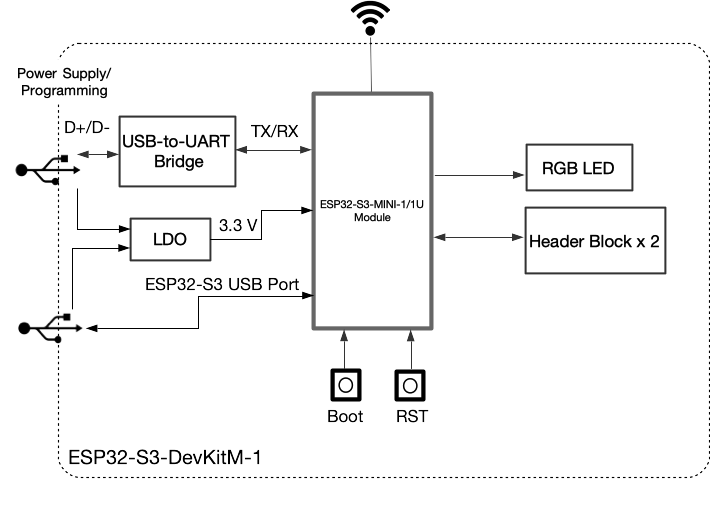
Power management on the ESP32-S3-DevKitM-1 is designed for flexibility, offering three distinct delivery paths. Developers can power the board via the onboard USB-to-UART bridge, the native ESP32-S3 USB port, or through external pins. The onboard LDO regulates the 5V input from the USB interfaces down to the 3.3V logic level required by the module.
WARNING: The power supply options provided on the ESP32-S3-DevKitM-1 are mutually exclusive or can be used in tandem with care. Do not attempt to force conflicting voltage levels (such as 5V and 3.3V) into the power headers simultaneously. Always verify your external power source voltage with a multimeter before connection to prevent permanent damage to the LDO or the ESP32-S3 module.
Understanding the ESP32-S3-DevKitM-1 Pinout requires close attention to power rails. The 3V3 pin serves as a direct input or an output from the internal LDO, while the 5V pin provides the raw supply rail. When utilizing external sensors, ensure that the cumulative current draw does not exceed the LDO’s thermal dissipation limits, which are managed by the board’s copper pour design.
3. Full Pinout Reference
The Following table details every physical pin on the headers.
J1
| No. | Name | Type1 | Function |
| 1 | 3V3 | P | 3.3 V power supply |
| 2 | 0 | I/O/T | RTC.GPIOO, GPIOO |
| 3 | 1 | I/O/T | RTC.GPIOl, GPIOl, TOUCH 1, ADC1_CH0 |
| 4 | 2 | I/O/T | RTC.GPI02, GPI02, TOUCH2, ADC1_CH1 |
| 5 | 3 | I/O/T | RTC.GPI03, GPI03, TOUCH3, ADC1_CH2 |
| 6 | 4 | I/O/T | RTC_GPI04, GPI04, TOUCH4, ADC1_CH3 |
| 7 | 5 | I/O/T | RTC.GPI05, GPI05, TOUCH5, ADC1_CH4 |
| 8 | 6 | I/O/T | RTC_GPI06, GPI06, TOUCH6, ADC1_CH5 |
| 9 | 7 | I/O/T | RTC.GPI07, GPI07, TOUCH7, ADC1_CH6 |
| 10 | 8 | I/O/T | RTC.GPI08, GPI08, TOUCH8, ADC1_CH7, SUBSPICS1 |
| 11 | 9 | I/O/T | RTC_GPI09, GPI09, TOUCH9, ADC1_CH8, FSPIHD, SUBSPIHD |
| 12 | 10 | I/O/T | RTC.GPIOIO, GPIOIO, TOUCH 10, ADC1_CH9, FSPICSO, FSPII04, SUB- SPICSO |
| 13 | 11 | I/O/T | RTC.GPIOl 1, GPIOl 1, TOUCH 11, ADC2_CH0, FSPID, FSPII05, SUBSPID |
| 14 | 12 | I/O/T | RTC.GPI012, GPIOl2, TOUCH 12, ADC2_CH1, FSPICLK, FSPII06, SUB- SPICLK |
| 15 | 13 | I/O/T | RTC.GPI013, GPIOl3, TOUCH 13, ADC2_CH2, FSPIQ, FSPII07, SUBSPIQ |
| 16 | 14 | I/O/T | RTC.GPI014, GPIOl4, TOUCH 14, ADC2_CH3, FSPIWP, FSPIDQS, SUB- SPIWP |
| 17 | 15 | I/O/T | RTC.GPI015, GPIOl5, UORTS, ADC2.CH4, XTAL_32K_P |
| 18 | 16 | I/O/T | RTC.GPI016, GPIOl6, UOCTS, ADC2.CH5, XTAL_32K_N |
| 19 | 17 | I/O/T | RTC.GPI017, GPIOl7, U1TXD, ADC2_CH6 |
| 20 | 18 | I/O/T | RTC_GPI018, GPIOl8, U1RXD, ADC2_CH7, CLK_OUT3 |
| 21 | 5V | P | 5 V power supply |
| 22 | G | G | Ground |
J3
| No. | Name | Type | Function |
| 1 | G | G | Ground |
| 2 | RST | I | EN |
| 3 | 46 | I/O/T | GPI046 |
| 4 | 45 | I/O/T | GPI045 |
| 5 | RX | I/O/T | UORXD, GPI044, CLK_0UT2 |
| 6 | TX | I/O/T | UOTXD, GPI043, CLK_0UT1 |
| 7 | 42 | I/O/T | MTMS, GPI042 |
| 8 | 41 | I/O/T | MTDI, GPI041, CLK_0UT1 |
| 9 | 40 | I/O/T | MTDO, GPI040, CLK_0UT2 |
| 10 | 39 | I/O/T | MTCK, GPI039, CLK_0UT3, SUBSPICS1 |
| 11 | 38 | I/O/T | GPI038, FSPIWP, SUBSPIWP |
| 12 | 37 | I/O/T | SPIDQS, GPI037, FSPIQ, SUBSPIQ |
| 13 | 36 | I/O/T | SPII07, GPI036, FSPICLK, SUBSPICLK |
| 14 | 35 | I/O/T | SPII06, GPI035, FSPID, SUBSPID |
| 15 | 34 | I/O/T | SPII05, GPI034, FSPICSO, SUBSPICSO |
| 16 | 33 | I/O/T | SPII04, GPI033, FSPIHD, SUBSPIHD |
| 17 | 26 | I/O/T | SPICS1, GPI026 |
| 18 | 21 | I/O/T | RTC_GPI021, GPI021 |
| 19 | 20 | I/O/T | RTC_GPI020, GPI020, U1CTS, ADC2_CH9, CLK_0UT1, USB_D+ |
| 20 | 19 | I/O/T | RTC_GPI019, GPIOl9, U1RTS, ADC2_CH8, CLK_OUT2, USB_D- |
| 21 | 48 | I/O/T | SPICLK_N, GPI048, SUBSPICLK_N_DIFF, RGB LED |
| 22 | 47 | I/O/T | SPICLK_P, GPI047, SUBSPICLK_P_DIFF |
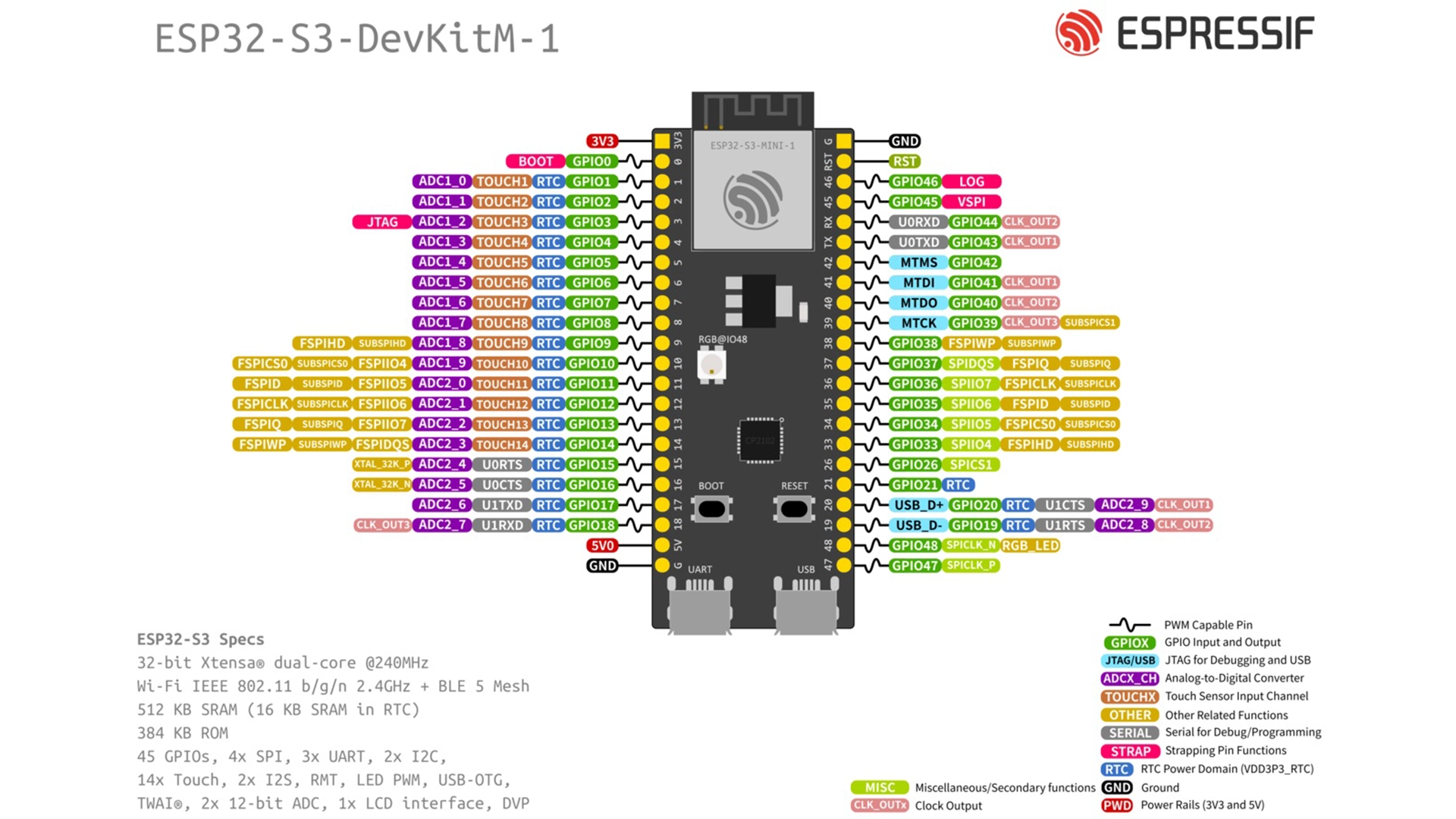
SoC/Chip Series Details: The ESP32-S3-DevKitM-1 is built around the ESP32-S3-MINI-1 or ESP32-S3-MINI-1U module. At the core of these modules lies the ESP32-S3FN8 chip, which integrates an 8 MB flash memory.
4. Programming and Firmware Download
Firmware deployment on the ESP32-S3-DevKitM-1 utilizes the internal ROM bootloader, which requires a specific physical sequence to initiate the download mode. This process is governed by the Boot button (IO0) and the Reset button. To enter download mode, hold the Boot button, press and release the Reset button, and then release the Boot button. This sequence ensures that the strapping pins—specifically IO0—are sampled at a low logic level during the power-on reset (POR) phase, instructing the ESP32-S3 to enter the serial firmware loading state.
5. Deep-Dive: Peripheral Architecture
The ESP32-S3-DevKitM-1 provides a rich hardware ecosystem. The Analog-to-Digital Converter (ADC) is based on the SAR (Successive Approximation Register) architecture, providing 12-bit resolution. When implementing analog sensors, note that the ADC2 channels may share dependencies with Wi-Fi functionality; therefore, plan your pin assignments accordingly to avoid contention.
UART communication is handled by multiple controllers. The primary debug UART (TX/RX) is routed through the USB-to-UART bridge, allowing for seamless logging via the serial monitor. For high-speed data transfer, the hardware SPI interfaces routed to the headers offer high-throughput capabilities, provided the board traces are kept short to maintain signal integrity at higher clock frequencies.
Thermal management for the ESP32-S3-DevKitM-1 is largely passive. The module utilizes the board’s PCB ground plane to dissipate heat generated by the Wi-Fi and Bluetooth radios during sustained transmission. If your application involves high-duty-cycle radio operation, consider active airflow or additional heatsinking if the module temperature approaches the upper operational limits specified in the datasheet. The ESP32-S3-DevKitM-1 Pinout is clearly defined, but always check for internal pull-up/pull-down states on pins like the MTMS and MTDI if your design includes custom JTAG implementation.
6. References & Legal Notice
This technical manual is developed based on the official documentation provided by Espressif Systems. We highly recommend referring to the primary source for the most recent updates regarding hardware revisions and detailed specifications.
Disclaimer: ESP32 and ESP32-S2 are registered trademarks of Espressif Systems (Shanghai) Co., Ltd. This guide is an independent technical review and is not an official publication of Espressif Systems.