

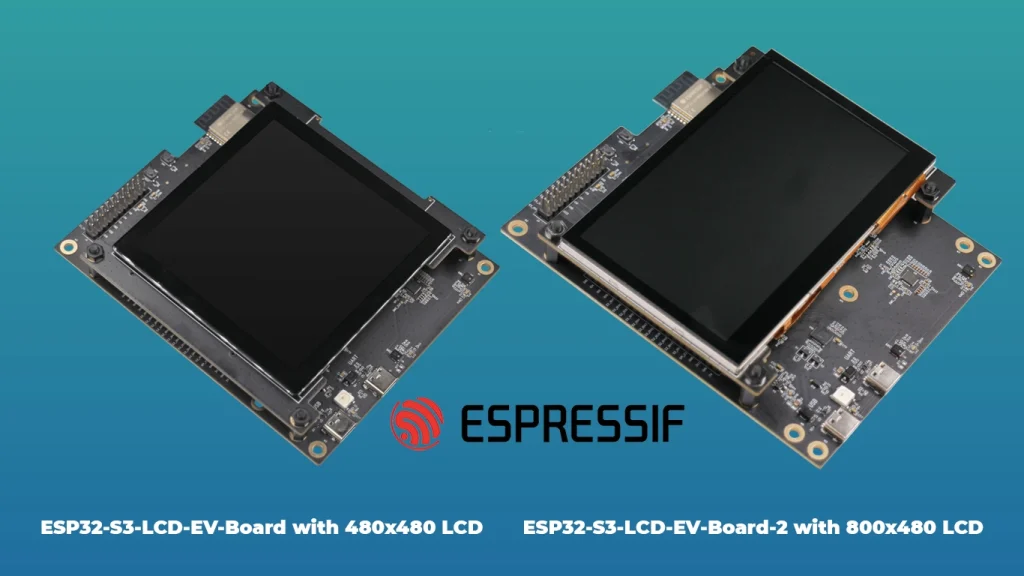
The ESP32-S3-LCD-EV-Board serves as the definitive platform for developers aiming to bridge the gap between high-performance AIoT processing and intuitive human-machine interfaces. Built around the powerful ESP32-S3-WROOM-1-N16R16V module, this board is not merely a development kit; it is an integrated ecosystem designed to handle demanding graphical workloads, local voice recognition, and real-time sensor fusion. For any engineer or hobbyist, mastering the ESP32-S3-LCD-EV-Board Pinout is the single most critical step to ensuring that peripheral communication, power distribution, and signal integrity remain uncompromised during the prototyping phase.
The versatility of this board is unmatched, offering support for a wide array of display interfaces, including RGB, 8080 parallel, SPI, and I2C. However, this flexibility comes with a complex GPIO mapping scheme. Because the ESP32-S3 module itself is highly multiplexed, developers must be diligent when referencing the ESP32-S3-LCD-EV-Board Pinout to prevent contention between critical subsystems like the integrated audio codec, I/O expanders, and the high-resolution display connectors. Misconfiguration at the pin level is the most common cause of boot failures and peripheral initialization errors, making this guide an essential reference for your hardware design cycle.
1. Architecture and Peripheral Integration
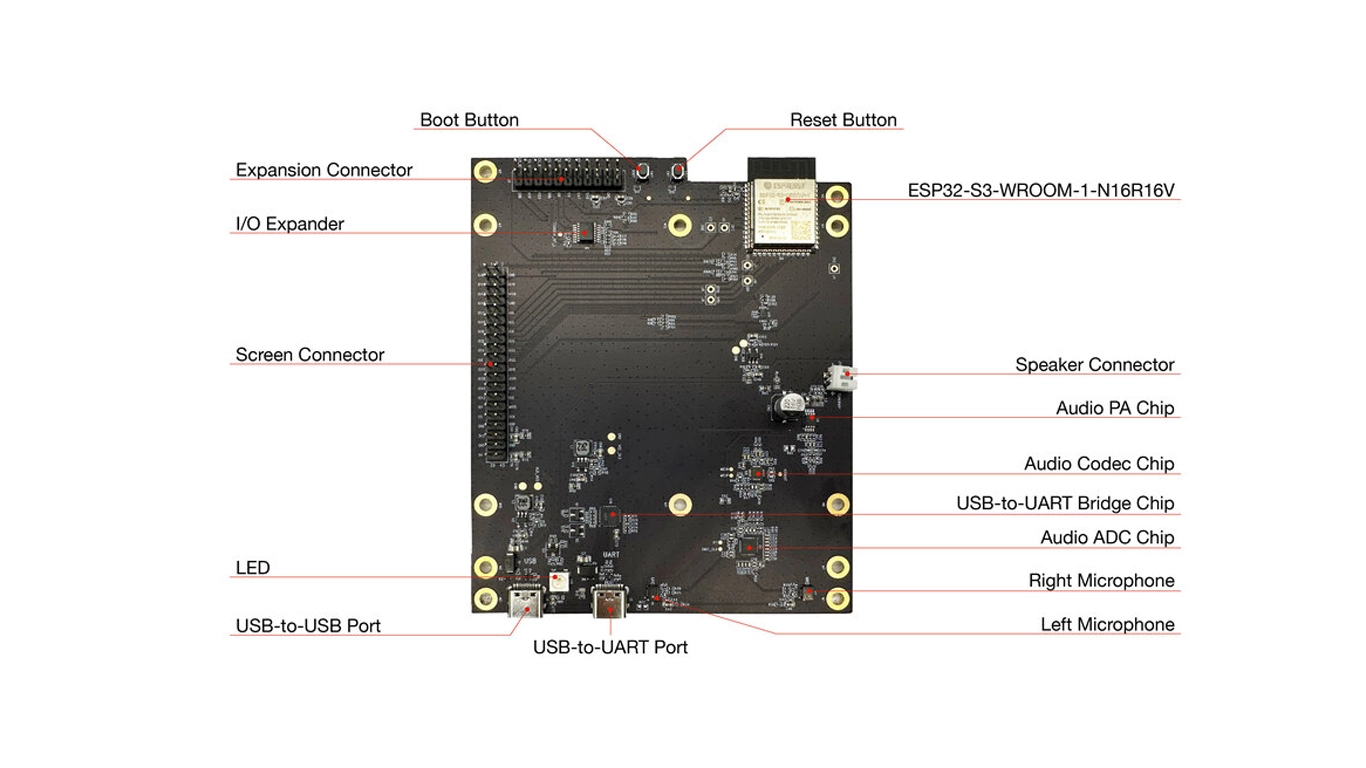
The core of the ESP32-S3-LCD-EV-Board is the ESP32-S3 SoC, which features dual Xtensa® 32-bit LX7 cores capable of running at up to 240 MHz. This processing power is supplemented by the board’s massive 16 MB of Flash and 16 MB of PSRAM. When analyzing the ESP32-S3-LCD-EV-Board Pinout, one must understand that the layout is optimized to provide high-speed access to these memory resources while simultaneously managing external display data lines. The board uses an I/O expander to handle slower peripheral signals, effectively reserving the primary GPIO pins for high-bandwidth tasks that require direct CPU-to-LCD communication.
Furthermore, the design philosophy behind the ESP32-S3-LCD-EV-Board Pinout prioritizes modularity. The board is designed to interface with various subboards (LCD-EV-Board-MB and others). This means that certain pins are routed through headers that allow for physical hot-swapping or re-configuration. If you are developing a custom PCB to mount atop this board, your routing must respect the specific impedance requirements of the high-speed data lines defined in the pinout. Failure to align your custom hardware with the board’s predefined routing will result in signal reflections and degradation, particularly on the LCD interface lines.
2. ESP32-S3-LCD-EV-Board Pinout
| Pin # | Pin Name | Type | Function |
|---|---|---|---|
| 1 | GND | P | Ground |
| 2 | 3V3 | P | 3.3V Power Supply |
| 3 | EN | I | Reset (Chip Enable) |
| 4 | IO4 | I/O | System LED |
| 5 | IO5 | I/O | I2S_MCLK |
| 6 | IO6 | I/O | I2S_CODEC_DSDIN |
| 7 | IO7 | I/O | I2S_LRCK |
| 8 | IO15 | I/O | I2S_ADC_SDOUT |
| 9 | IO16 | I/O | I2S_SCLK |
| 10 | IO17 | I/O | LCD_DE (Data Enable) |
| 11 | IO18 | I/O | LCD_DATA7 |
| 12 | IO8 | I/O | LCD_DATA6 |
| 13 | IO19 | I/O | USB_D- |
| 14 | IO20 | I/O | USB_D+ |
| 15 | IO3 | I/O | LCD_VSYNC |
| 16 | IO46 | I/O | LCD_HSYNC |
| 17 | IO9 | I/O | LCD_PCLK |
| 18 | IO10 | I/O | LCD_DATA0 |
| 19 | IO11 | I/O | LCD_DATA1 |
| 20 | IO12 | I/O | LCD_DATA2 |
| 21 | IO13 | I/O | LCD_DATA3 |
| 22 | IO14 | I/O | LCD_DATA4 |
| 23 | IO21 | I/O | LCD_DATA5 |
| 24 | IO47 | I/O | I2C_SDA |
| 25 | IO48 | I/O | I2C_SCL |
| 26 | IO45 | I/O | LCD_DATA8 |
| 27 | IO0 | I/O | Boot Strapping |
| 28 | IO35 | I/O | Reserved/No connection |
| 29 | IO36 | I/O | Reserved/No connection |
| 30 | IO37 | I/O | Reserved/No connection |
| 31 | IO38 | I/O | LCD_DATA9 |
| 32 | IO39 | I/O | LCD_DATA10 |
| 33 | IO40 | I/O | LCD_DATA11 |
| 34 | IO41 | I/O | LCD_DATA12 |
| 35 | IO42 | I/O | LCD_DATA13 |
| 36 | RXD0 | I/O | UART_RXD0 |
| 37 | TXD0 | I/O | UART_TXD0 |
| 38 | IO2 | I/O | LCD_DATA14 |
| 39 | IO1 | I/O | LCD_DATA15 |
| 40 | GND | P | Ground |
| 41 | EPAD | P | Ground (Exposed Pad) |
3. Power Options and Management
Powering the ESP32-S3-LCD-EV-Board requires careful consideration of the entire system load, which includes not just the SoC but also the power-hungry LCD backlight, audio codec, and potential expansion modules. The board accepts 5V input via USB, but it is critical to observe strict power discipline. Never attempt to draw power from multiple sources simultaneously. The onboard power path controller is designed to handle a single 5V source, and concurrent power delivery from both USB ports can lead to reverse currents, potential damage to the USB-to-UART bridge, and catastrophic failure of the 3.3V LDO regulator.
WARNING: Do not attempt to power the board via both USB ports simultaneously. Simultaneous power delivery can cause severe electrical instability and damage the onboard bridge controllers or host hardware. Always ensure you are utilizing only one power entry point and that your supply is rated for at least 5V/2A to account for the high transient current spikes common during Wi-Fi transmission or when the LCD backlight is driven to maximum brightness.
4. Technical Deep Dives
Analog-to-Digital Conversion (ADC)
The conversion of analog sensor voltages into digital bits is a fundamental process in modern embedded systems, and the ESP32-S3-LCD-EV-Board excels here due to its sophisticated ADC integration. The SoC employs a Successive Approximation Register (SAR) architecture. In this process, the ADC uses a binary search algorithm to compare the unknown input voltage against a known reference voltage (Vref). It attempts to «guess» the value bit by bit, starting from the Most Significant Bit (MSB), adjusting the internal Digital-to-Analog Converter (DAC) with each step until it matches the input signal. Resolution is the key metric here—a higher resolution provides a more granular digital representation of the analog signal. The impacts of Vref stability cannot be overstated; if the 3.3V rail is noisy, the ADC resolution effectively drops because the reference voltage itself is fluctuating, leading to «jitter» in the digitized audio or sensor data. Consequently, the board includes decoupling capacitors near the ADC input pins to stabilize the signal chain.
UART and Serial Communication
Serial communication is the lifeline between your development PC and the ESP32-S3 module. The board features a CP2102N UART-to-USB bridge, which provides a bridge for asynchronous communication. The synchronization of baud rates is critical; the ESP32-S3 relies on the baud rate to define the sampling period for incoming bits. If the host PC and the SoC are not perfectly synchronized, data frames will be incorrectly interpreted, leading to framing errors and the «garbage characters» frequently seen in serial monitors. Beyond simple data transfer, the UART interface is integral to the board’s logic, as it utilizes the DTR and RTS handshake signals. These signals are manipulated by the firmware flashing software to automatically toggle the module’s EN (Reset) and IO0 (Boot) pins, facilitating a seamless firmware download process without manual intervention.
LDO and Thermal Management
The Low Dropout (LDO) regulators present on the ESP32-S3-LCD-EV-Board are responsible for the critical task of stepping down the 5V USB input to the 3.3V rail required by the SoC. Unlike switching regulators, which are highly efficient but can be electrically noisy, LDOs provide a cleaner, quieter power supply, which is ideal for sensitive analog components. However, the trade-off is efficiency; an LDO dissipates the difference between input and output voltage as heat. When the system is operating at full capacity—such as when the LCD is drawing significant current for its backlight—the LDOs will generate substantial heat. Thermal management is therefore not optional. If the board is placed in a small, enclosed casing, the heat can build up and trigger thermal shutdown circuits, causing the board to restart unexpectedly. Always ensure adequate ventilation or use thermal interface materials if mounting the board in a custom enclosure.
Strapping Pins and Boot Logic
Strapping pins are unique GPIOs that define the boot behavior of the ESP32-S3. At the exact moment of reset (when the EN pin is released), the SoC samples the voltage levels on IO0 and other pins. This logic is used to determine if the device should boot into «Flash Download Mode» or execute code from memory. If IO0 is pulled low during reset, the chip enters a state where it expects serial firmware data via UART. The board’s design includes pull-up resistors to ensure the chip defaults to normal operation. This mechanism is the primary reason why shorting the Boot button is required to force the device into a state ready for programming. Understanding this sampling logic is essential if you ever attempt to interface external hardware with these specific pins, as an inadvertent pull-down on IO0 during power-up will prevent the board from starting its primary firmware.
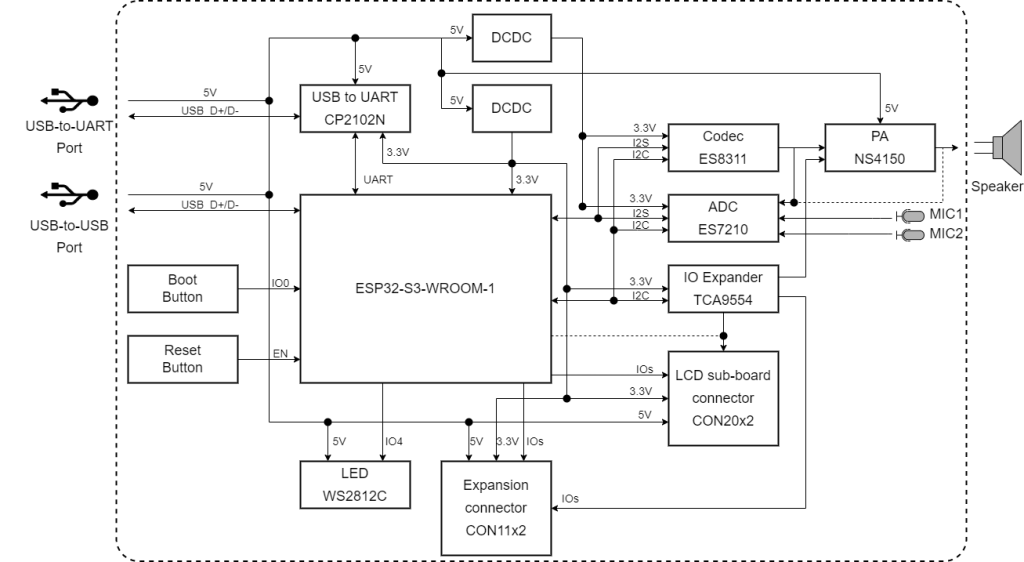
[Image: Block Diagram — Source: PDF Page 3]
By leveraging the information in this guide and referencing the detailed ESP32-S3-LCD-EV-Board Pinout, developers can successfully prototype complex AIoT solutions, utilizing the full range of audio, video, and connectivity features that the ESP32-S3 platform offers. Mastery of these physical connections is the foundation of hardware reliability.
7. References & Legal Notice
This technical manual is developed based on the official documentation provided by Espressif Systems. We highly recommend referring to the primary source for the most recent updates regarding hardware revisions and detailed specifications.
Disclaimer: ESP32 and ESP32-S2 are registered trademarks of Espressif Systems (Shanghai) Co., Ltd. This guide is an independent technical review and is not an official publication of Espressif Systems.