

The ESP32-C2 series represents a strategic leap in cost-effective, high-performance wireless communication. According to the official documentation, the ESP32-C2 SoC series group currently includes the ESP8684 series. Consequently, any technical reference to the ESP32-C2 within this architectural ecosystem applies directly to the ESP8684 chip. This hardware platform is centered around the ESP8684-MINI-1 module, a general-purpose powerhouse designed for Wi-Fi and Bluetooth LE coexistence.
Understanding the ESP8684-DevKitM-1 Pinout is critical for developers transitioning from prototype to production. The SoC architecture is designed to handle sophisticated wireless stacks while maintaining a minimal power footprint. The ESP8684-MINI-1 module itself is available in multiple variants, typically distinguished by the amount of integrated SPI flash, ranging from 1 MB to 4 MB. This integration of flash memory directly on the module simplifies the PCB design, reducing the need for external components and ensuring signal integrity for high-speed data bus operations.
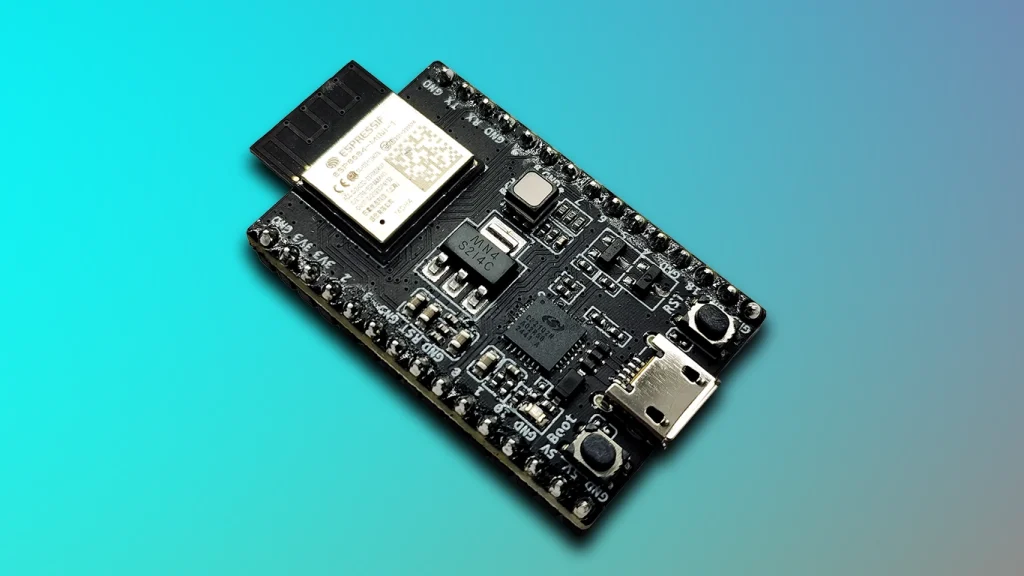
1. Hardware Architecture and Module Integration
he ESP8684-DevKitM-1 is an entry-level development board that serves as the primary evaluation vehicle for the ESP8684-MINI-1 module. This board is engineered to break out most of the I/O pins to headers on both sides, allowing for seamless interfacing with external sensors, actuators, and power management circuits. For rapid prototyping, developers can utilize jumper wires or mount the entire board onto a standard breadboard.
The core of the board, the ESP8684-MINI-1, features a built-in PCB antenna, ensuring that the RF path is optimized out of the box. When analyzing the ESP8684-DevKitM-1 Pinout, it is important to recognize that the chip name (ESP8684) refers to the silicon, while the module name encompasses the chip, crystal oscillator, and the SPI flash. This distinction is vital for hardware architects who must account for the electrical characteristics of the integrated flash when designing power-up sequences and timing-critical applications.
2. Power Supply Options and Electrical Logic
The board provides three mutually exclusive methods for delivering power to the ESP8684-MINI-1 module:
WARNING: Power Source Conflict The power supply options are mutually exclusive. Providing power through multiple sources simultaneously (e.g., USB and the 5V pin) can cause electrical contention, potentially damaging the development board or the connected host computer
The Role of the LDO Regulator
The board features a 5 V to 3.3 V LDO (Low-Dropout) linear regulator
. In hardware design, an LDO’s primary role is to take a higher, potentially noisy input voltage (like the 5V from USB) and regulate it down to a clean, stable 3.3V required by the ESP8684 chip
. Unlike switching regulators, an LDO provides a ripple-free output, which is essential for the sensitive analog-to-digital converters and RF radio stages within the SoC. The presence of the 5 V Power On LED provides a visual confirmation that the USB power rail is active.
3. Detailed ESP8684-DevKitM-1 Pinout Tables
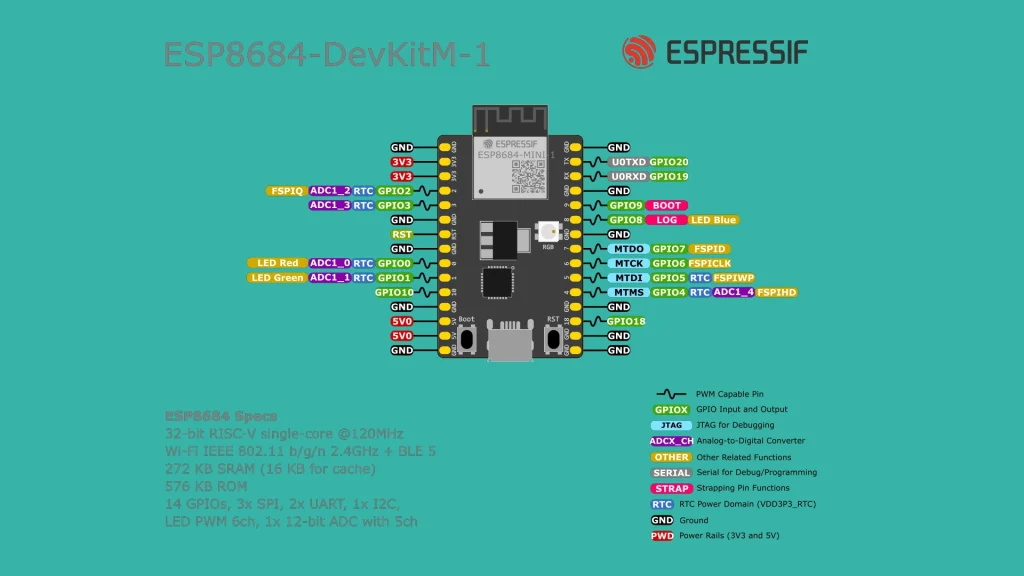
The following tables outline the electrical functions of the J1 and J3 headers. Mastering the ESP8684-DevKitM-1 Pinout is the first step in ensuring that your peripheral multiplexing does not conflict with internal SoC requirements.
J1 Header (Left Side)
| Pin # | Name | Type | Function |
| 1 | G | G | Ground |
| 2 | 3V3 | P | 3.3 V power supply |
| 3 | 3V3 | P | 3.3 V power supply |
| 4 | 2 | I/O/T | GPIO2, ADC1_CH2, FSPIQ |
| 5 | 3 | I/O/T | GPIO3, ADC1_CH3 |
| 6 | G | G | Ground |
| 7 | RST | I | Reset; High: enable; Low: powers off |
| 8 | G | G | Ground |
| 9 | 0 | I/O/T | GPIO0, ADC1_CH0, LED Red |
| 10 | 1 | I/O/T | GPIO1, ADC1_CH1, LED Green |
| 11 | 10 | I/O/T | GPIO10, FSPICS0 |
| 12 | G | G | Ground |
| 13 | 5V | P | 5 V power supply |
| 14 | 5V | P | 5 V power supply |
| 15 | G | G | Ground |
J3 Header (Right Side)
| Pin # | Name | Type | Function |
| 1 | G | G | Ground |
| 2 | TX | I/O/T | GPIO20, U0TXD |
| 3 | RX | I/O/T | GPIO19, U0RXD |
| 4 | G | G | Ground |
| 5 | 9 | I/O/T | GPIO9 (Strapping Pin) |
| 6 | 8 | I/O/T | GPIO8 (Strapping Pin), LED Blue |
| 7 | G | G | Ground |
| 8 | 7 | I/O/T | GPIO7, FSPID, MTDO |
| 9 | 6 | I/O/T | GPIO6, FSPICLK, MTCK |
| 10 | 5 | I/O/T | GPIO5, ADC2_CH0, FSPIWP, MTDI |
| 11 | 4 | I/O/T | GPIO4, ADC1_CH4, FSPIHD, MTMS |
| 12 | G | G | Ground |
| 13 | 18 | I/O/T | GPIO18 |
| 14 | G | G | Ground |
| 15 | G | G | Ground |
4. Advanced Hardware Functionality
The ESP8684-DevKitM-1 Pinout reveals several specialized functions that go beyond standard digital I/O. Understanding these is vital for robust hardware integration.
ADC: Analog-to-Digital Conversion
The ESP8684 features multiple ADC channels (e.g., ADC1_CH0 through ADC1_CH4). The ADC is the process of converting continuous analog sensor voltages into discrete digital bits that the CPU can process. For instance, if a temperature sensor outputs a voltage between 0V and 3.3V, the ADC samples this voltage and converts it into a digital value. This is essential for reading any sensor that does not communicate via a digital protocol like I2C or SPI.
UART and the USB-to-UART Bridge
The board includes a dedicated USB-to-UART Bridge chip
. This component acts as a translator between the high-speed USB differential signaling of your PC and the serial Transmit/Receive (TX/RX) logic levels of the ESP8684. This bridge supports transfer rates up to 3 Mbps, allowing for rapid firmware flashing and high-speed serial debugging. The primary UART pins (GPIO19 and GPIO20) are pre-routed to this bridge but are also available on the ESP8684-DevKitM-1 Pinout for external serial communication
Strapping Pins and Boot Logic
GPIO8 and GPIO9 are designated as Strapping Pins. During the chip power-up or system reset, the internal hardware samples the voltage levels on these pins to determine the boot mode.
Because these pins have dual roles, developers must ensure that any external circuitry connected to GPIO8 or GPIO9 does not inadvertently pull the voltage to an incorrect level during the boot sequence, which would prevent the SoC from starting correctly.
5. Programming and Firmware Setup
To interact with the ESP8684-DevKitM-1 Pinout programmatically, you must first flash the device. The board features a Boot Button and a Reset Button to facilitate this.
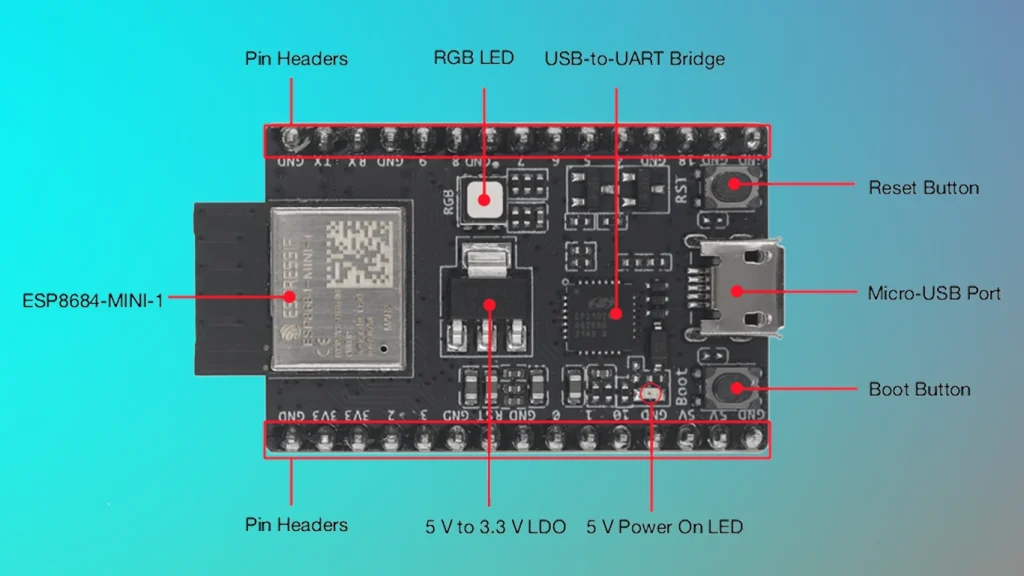
The block diagram illustrates the tight integration between the ESP8684-MINI-1 module, the RGB LED (driven by GPIO0, GPIO1, and GPIO8), and the power management system. By adhering to the documented ESP8684-DevKitM-1 Pinout, you can leverage the full potential of this Wi-Fi and Bluetooth LE platform for your next IoT project.
6. References & Legal Notice
This technical manual is developed based on the official documentation provided by Espressif Systems. We highly recommend referring to the primary source for the most recent updates regarding hardware revisions and detailed specifications.
Disclaimer: ESP32 and ESP32-S2 are registered trademarks of Espressif Systems (Shanghai) Co., Ltd. This guide is an independent technical review and is not an official publication of Espressif Systems.