

The evolution of the Internet of Things (IoT) demands hardware that is not only compact and energy-efficient but also accessible for rapid integration and prototyping. The ESP32-C3-DevKitM-1 serves as a cornerstone in this ecosystem, providing a high-performance development environment based on the ESP32-C3-MINI-1 module. This module represents a significant leap in development board design, integrating the RISC-V 32-bit single-core microprocessor with comprehensive wireless connectivity, including Wi-Fi and Bluetooth Low Energy. For engineers tasked with designing custom PCB shields or simply prototyping the next generation of connected sensors, the ESP32-C3-DevKitM-1 Pinout provides the roadmap necessary to navigate the complexities of modern peripheral interfacing.
Understanding this board begins with acknowledging the relationship between the SoC and the module. The ESP32-C3 is the silicon heart—a highly integrated system-on-chip—while the ESP32-C3-MINI-1 is the packaged module, which includes critical components like the PCB antenna, crystal oscillator, and 4 MB of integrated SPI Flash. By utilizing the ESP32-C3-DevKitM-1 Pinout, developers gain direct access to the module’s GPIOs, which are strategically routed to external headers for breadboard compatibility and custom hardware expansion.
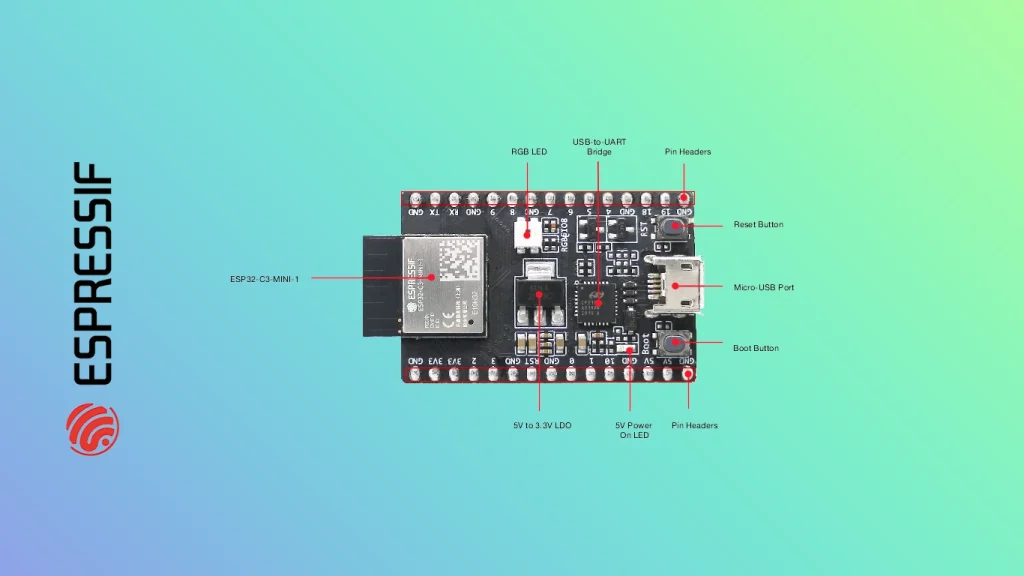
1. Power Options, Design, and the ESP32-C3-DevKitM-1 Pinout
Reliable power delivery is the foundation of every stable embedded system. The design of the ESP32-C3-DevKitM-1 is centered around flexibility, offering developers multiple ways to energize the system. You can power the board via the onboard USB Type-C connector, which acts as both the power source and the communication bridge, or through external pins if your application requires a dedicated power rail, such as a bench power supply or a lithium-polymer battery circuit.
When designing your final circuit, you must prioritize the integrity of the power path. The onboard Low Dropout Regulator (LDO) is responsible for taking the 5V input (from USB or external headers) and regulating it down to the 3.3V necessary for the ESP32-C3 silicon. A linear regulator is favored in this development context because it produces a very clean output voltage with minimal switching noise, which is essential for ensuring that analog signals are not corrupted by power ripple.
Thermal management is a critical consideration when pushing the limits of this hardware. Because the LDO is a linear device, it dissipates excess energy as heat. If your peripheral devices—such as sensors, displays, or wireless transmission modules—demand significant current from the 3.3V rail, the heat generated by the LDO can lead to thermal throttling or even erratic system behavior. When designing custom enclosures or shielding, ensure there is adequate airflow around the LDO component. In thermally constrained environments, consider utilizing thermal vias in your PCB design to move heat from the LDO package into the ground plane, effectively using your copper layers as a heatsink.
2. Technical Deep Dive: Peripherals and Electrical Logic
To master the ESP32-C3-DevKitM-1 Pinout, one must look beyond simple digital I/O and understand the underlying electrical architecture of the peripherals.
ADC Architecture and Sampling Precision
The ADC (Analog-to-Digital Converter) within the ESP32-C3 is a Successive Approximation Register (SAR) type. The SAR ADC is widely used in mixed-signal ICs because of its excellent balance between power consumption and resolution. It functions by using a comparator to test the input voltage against a reference voltage generated internally by a DAC (Digital-to-Analog Converter). The process involves a binary search: the converter checks the Most Significant Bit (MSB), makes an adjustment, and iterates through every subsequent bit.
When you use the ADC pins on the ESP32-C3-DevKitM-1 Pinout, you are essentially sampling a voltage and mapping it to a 12-bit integer (0 to 4095). However, signal integrity is paramount. If your external sensor has a high output impedance, it will fail to charge the ADC’s internal sampling capacitor within the allotted time, leading to «ghosting» or inaccurate readings. Always ensure your sensor circuit has low output impedance, or use an operational amplifier as a voltage follower (buffer) to stabilize the signal before it reaches the GPIO pin.
UART and Serial Communication
UART is the workhorse of embedded debugging. The board includes a USB-to-UART bridge that translates the differential USB signals (D+/D-) into the single-ended UART (TX/RX) signals required by the ESP32-C3. This bridge is not merely a level shifter; it is a complex serial transceiver that must synchronize baud rates. If the baud rate on your PC terminal does not perfectly match the baud rate initialized in the SoC firmware, you will receive «framing errors» and garbled data.
When connecting external sensors to the UART pins on the ESP32-C3-DevKitM-1 Pinout, be mindful of logic levels. The ESP32-C3 is a 3.3V device. Connecting a 5V UART device directly to the TX/RX pins will exceed the absolute maximum voltage ratings of the GPIO pins, potentially destroying the input protection diodes and the internal logic gates. Always utilize a logic-level converter or a voltage divider if interacting with 5V logic.
Strapping Pins: The Gatekeepers of Boot Logic
One of the most critical aspects of the ESP32-C3-DevKitM-1 Pinout is the «strapping pin» functionality. Pins like GPIO 2, GPIO 8, and GPIO 9 are sampled by the SoC at the exact moment of power-on or reset. The internal ROM bootloader reads these pins to determine the boot mode—for instance, whether to execute code from the internal Flash memory, start the UART bootloader, or enter a diagnostic mode.
During the development process, avoid attaching pull-up or pull-down resistors to these pins that might conflict with the default state required for booting. If you accidentally hold a strapping pin in the wrong state during a system reset, the device may appear to be «bricked.» Understanding that these pins serve a dual purpose—as user GPIOs after boot and as configuration inputs during boot—is essential for avoiding common hardware debugging pitfalls.
3. Complete Pin Reference Table
The following table provides the exhaustive mapping of the headers found on the ESP32-C3-DevKitM-1. Each pin is listed individually to ensure your integration remains precise.
| Pin # | Name | Type | Function |
| 1 | 3V3 | P | 3.3V Power Supply |
| 2 | RST | I | CHIP_PU (Reset) |
| 3 | IO2 | I/O/T | GPIO2 (Strapping) |
| 4 | IO3 | I/O/T | GPIO3 / ADC1_CH3 |
| 5 | IO4 | I/O/T | GPIO4 / ADC1_CH4 |
| 6 | IO5 | I/O/T | GPIO5 / ADC2_CH0 |
| 7 | IO6 | I/O/T | GPIO6 / FSPICLK |
| 8 | IO7 | I/O/T | GPIO7 / FSPID |
| 9 | IO8 | I/O/T | GPIO8 (Strapping) |
| 10 | IO9 | I/O/T | GPIO9 (Strapping/Boot) |
| 11 | GND | G | Ground |
| 12 | 5V | P | 5V Power Supply |
| 13 | IO21 | I/O/T | GPIO21 / U0TXD |
| 14 | IO20 | I/O/T | GPIO20 / U0RXD |
| 15 | IO19 | I/O/T | GPIO19 / USB_D+ |
| 16 | IO18 | I/O/T | GPIO18 / USB_D- |
| 17 | IO10 | I/O/T | GPIO10 |
| 18 | IO1 | I/O/T | GPIO1 / ADC1_CH1 |
| 19 | IO0 | I/O/T | GPIO0 / ADC1_CH0 |
| 20 | GND | G | Ground |
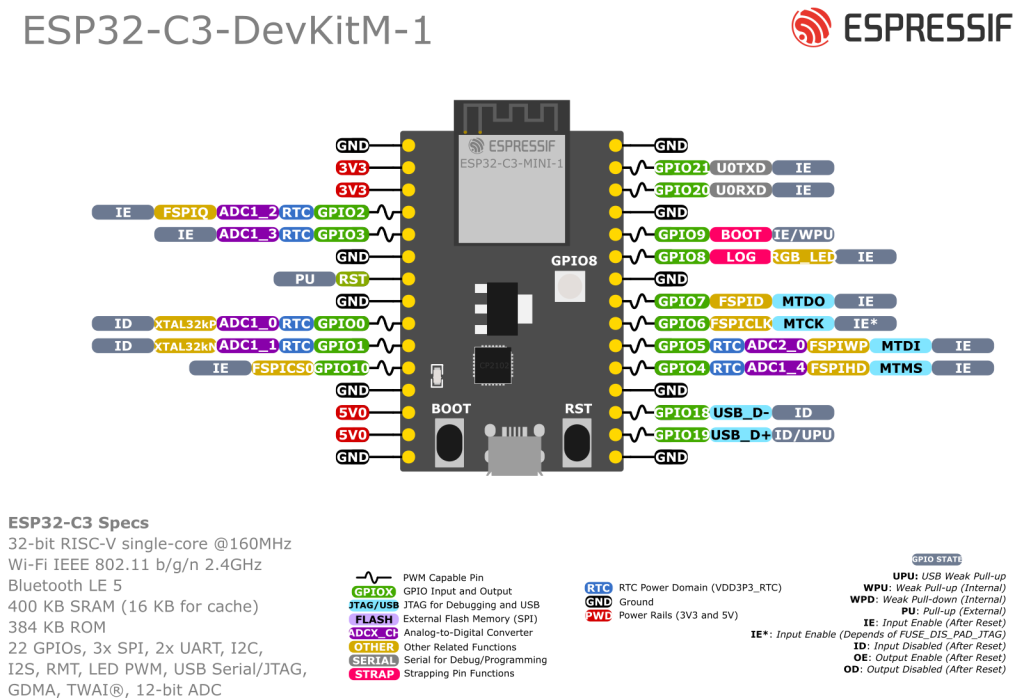
4. Programming and Firmware Download Mode
Transitioning the board into «Firmware Download Mode» is a requirement for updating the device firmware. This process involves a specific hardware timing sequence. To enter this mode, you must hold the «Boot» button (connected to GPIO 9) while you press and release the «Reset» button. This sequence ensures that GPIO 9 is driven to a logic low state specifically during the reset cycle of the RISC-V core.
Upon detecting this low state, the internal bootloader pauses the execution of the primary application stored in Flash and switches to the UART download protocol. At this point, the ESP32-C3 will begin listening for firmware binary packets from your computer. Once the transfer is complete, resetting the board without holding the Boot button allows the SoC to boot normally into your application code. This interaction is central to the development workflow, and knowing how to manually trigger it is essential if your automatic reset circuitry fails or is unavailable.
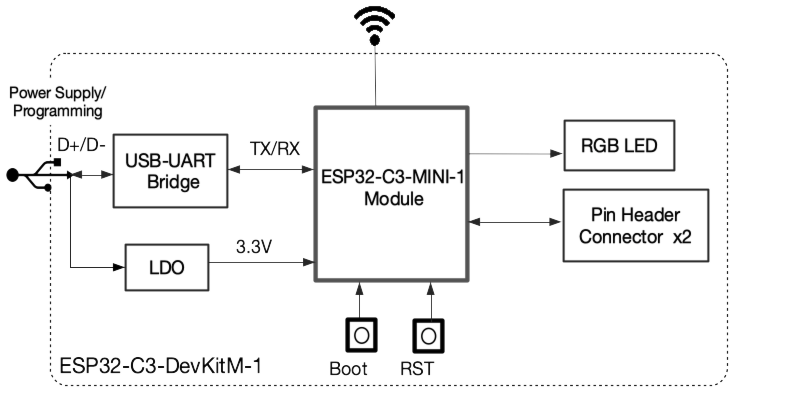
By analyzing the block diagram, you can visualize how the power regulation, the USB bridge, and the RISC-V silicon interact. This internal architecture is optimized for low-power operation, but it is also fragile if mishandled. Whether you are probing the GPIO pins with an oscilloscope or designing a complex PCB shield, the key to success lies in respecting the electrical constraints of the ESP32-C3-DevKitM-1 Pinout and ensuring that every signal is properly terminated and driven.
7. References & Legal Notice
This technical manual is developed based on the official documentation provided by Espressif Systems. We highly recommend referring to the primary source for the most recent updates regarding hardware revisions and detailed specifications.
Disclaimer: ESP32 and ESP32-S2 are registered trademarks of Espressif Systems (Shanghai) Co., Ltd. This guide is an independent technical review and is not an official publication of Espressif Systems.