

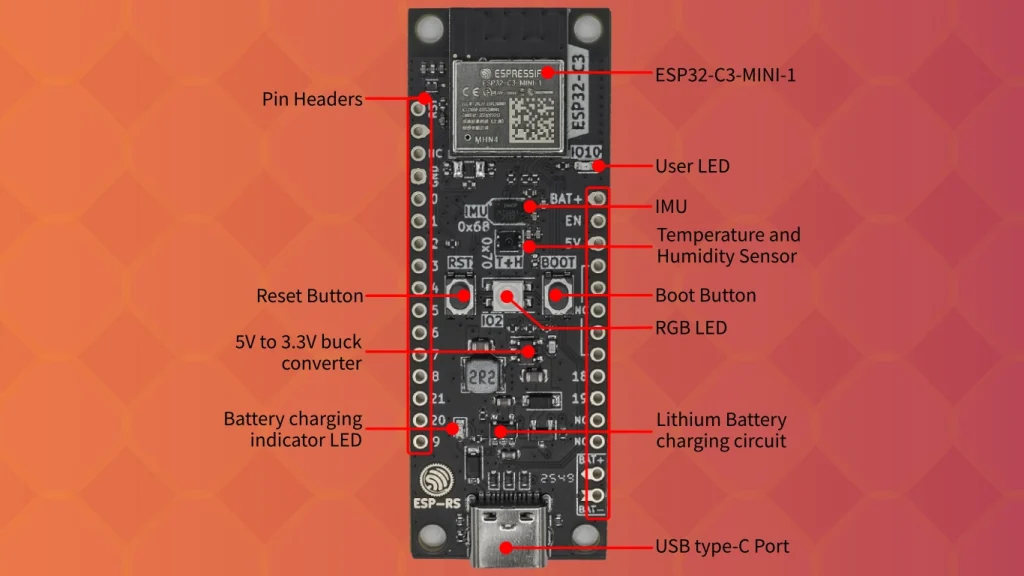
The ESP32-C3-DevKit-RUST-2 stands as a pivotal component in the modern IoT landscape, acting as a high-performance, cost-effective bridge between the emerging RISC-V architecture and rapid prototyping. This development board is engineered around the ESP32-C3-MINI-1 module, which incorporates 4 MB of SPI flash, ensuring robust storage for complex firmware images. For engineers, hobbyists, and firmware developers, mastering the ESP32-C3-DevKit-RUST-2 Pinout is the essential first step in transitioning from a breadboard prototype to a reliable, deployed product.
1. Introduction & Architecture
At the core of this board lies the ESP32-C3 series, a single-core, 32-bit RISC-V processor designed for high performance and low power consumption. Unlike its predecessors, which often relied on proprietary Xtensa architectures, this shift to RISC-V marks a significant milestone in open-standard hardware design. The architecture is specifically optimized for IoT sensing applications, providing essential Wi-Fi and Bluetooth Low Energy (BLE) connectivity in a compact, energy-efficient package.
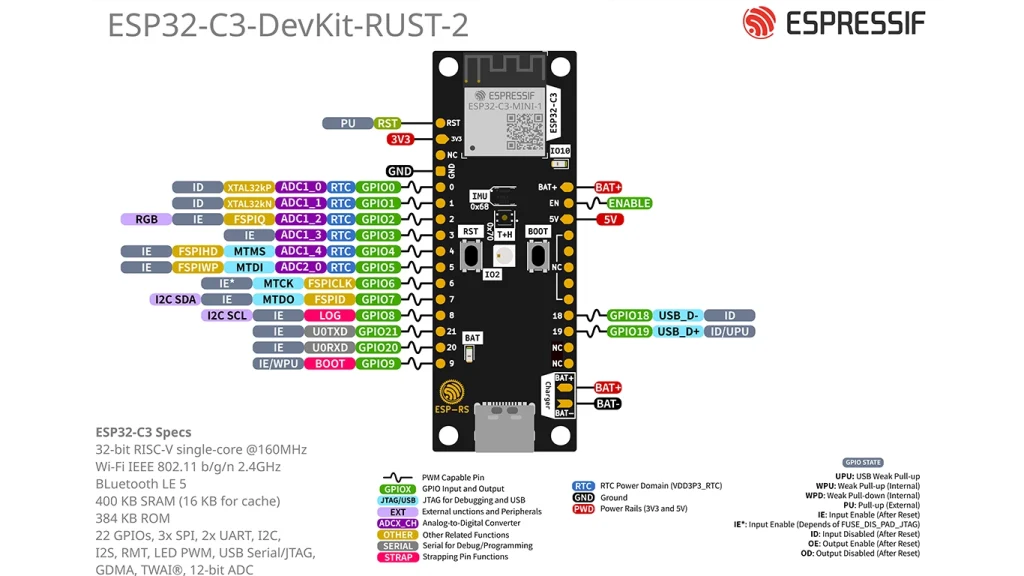
The ESP32-C3-DevKit-RUST-2 Pinout is meticulously designed to break out the vast majority of the module’s GPIOs to standard 2.54mm pitch headers. This allows for direct integration into standard breadboards or custom-designed PCB shields. The versatility of these pins is what truly drives the board’s utility; most pins are multiplexed to support multiple critical functions, including ADC (Analog-to-Digital Converter), UART (Universal Asynchronous Receiver/Transmitter), SPI, and PWM. By understanding how these signals route through the chip, you can unlock the full potential of your peripheral integrations.
2. Power Management and Signal Integrity
Reliable power delivery is the foundation of any hardware project, particularly when working with wireless SoCs that can experience rapid current spikes during Wi-Fi transmission. The board provides three mutually exclusive ways to provide power to the system: the USB Type-C port (the recommended default), the 5V and GND pin headers, or the battery connector.
The Role of the LDO and Thermal Management
The on-board Low Dropout Regulator (LDO) is a critical component for stabilizing the system. It converts the 5V input from the USB or external supply down to a clean, stable 3.3V, which the ESP32-C3 chip requires for core operation. Linear regulators like this are preferred in development kits because they have minimal switching noise compared to DC-DC buck converters, ensuring that sensitive analog circuits (like the internal ADC) receive a stable voltage rail.
However, linear regulators dissipate excess power as heat. Power dissipation is calculated as (Input Voltage — Output Voltage) * Current. If you are drawing significant current from the 3.3V rail—perhaps powering external sensors or high-brightness LEDs—be mindful of thermal management. The board is designed to mitigate heat, but operating near the maximum current threshold without proper airflow can lead to thermal throttling or unexpected system resets. When designing custom PCB shields, incorporate thermal vias under the board’s power components to improve heat dissipation.
3. Technical Deep Dives: Peripherals and Boot Logic
The ESP32-C3-DevKit-RUST-2 Pinout encompasses a variety of pin types, including Power (P), Ground (G), Input (I), Output (O), and High Impedance (T). Mastering these definitions is vital for sophisticated firmware development.
ADC (Analog-to-Digital Converter)
The ESP32-C3 features an internal Successive Approximation Register (SAR) ADC. The SAR architecture functions by comparing the input voltage against an internal reference voltage through a binary search algorithm. It uses a sample-and-hold circuit to capture the analog voltage, then executes a series of comparisons—one for each bit of resolution. The resolution, typically 12-bit, allows for 4096 distinct levels. When using the ADC pins, ensure the input signal impedance is low. High-impedance sources can cause significant errors due to the charge redistribution during the conversion process, potentially leading to inaccurate sensor readings.
UART and Serial Communication
The UART (Universal Asynchronous Receiver/Transmitter) is a simple, effective protocol for point-to-point communication. It operates based on synchronized baud rates, meaning both the ESP32-C3 and your PC must agree on the speed of transmission (e.g., 115200 bps). If the baud rates do not match exactly, you will observe «garbage» data on your terminal. The bridge circuitry on the board handles the translation between USB differential signals (D+/D-) and the logic-level UART (TX/RX) signals. Always ensure your TX of the peripheral connects to the RX of the board and vice versa.
Strapping Pins
One of the most nuanced aspects of the ESP32-C3-DevKit-RUST-2 Pinout is the presence of «strapping pins.» Pins like GPIO2, GPIO8, and GPIO9 are sampled by the chip at the exact moment of power-up or system reset. The logic levels (High or Low) present on these pins determine the boot behavior of the processor. For instance, the combination of logic levels determines whether the chip boots from internal flash or enters «Firmware Download Mode.» This is why holding the «Boot» button (typically connected to GPIO9) during a reset forces the chip into a state where it waits for new firmware over the USB/UART interface.
4. Pin Header Reference Table
The following table details the mapping of the ESP32-C3-DevKit-RUST-2 Pinout for the left and right headers. Please ensure you cross-reference these with your schematics before making connections to avoid potential conflicts with on-board peripherals like the IMU or the Temperature sensor.
| Pin # | Header Side | Name | Type | Function |
| 1 | Left | RST | I | EN / CHIP_PU |
| 2 | Left | 3V3 | P | 3.3 V power supply |
| 3 | Left | N/C | — | Not connected |
| 4 | Left | GND | G | Ground |
| 5 | Left | IO0 | I/O/T | GPIO0, ADC1_CH0 |
| 6 | Left | IO1 | I/O/T | GPIO1, ADC1_CH1 |
| 7 | Left | IO2 | I/O/T | GPIO2, ADC1_CH2 |
| 8 | Left | IO3 | I/O/T | GPIO3, ADC1_CH3 |
| 9 | Left | IO4 | I/O/T | GPIO4, ADC2_CH0 |
| 10 | Left | IO5 | I/O/T | GPIO5, ADC2_CH1 |
| 11 | Left | IO6 | I/O/T | GPIO6, MTCK |
| 12 | Left | IO7 | I/O/T | GPIO7, MTDO, LED |
| 13 | Left | IO8 | I/O/T | GPIO8, LOG |
| 14 | Left | RX | I/O/T | GPIO21, U0RXD |
| 15 | Left | TX | I/O/T | GPIO20, U0TXD |
| 16 | Left | IO9 | I/O/T | GPIO9, BOOT |
| 1 | Right | BAT+ | P | Battery supply |
| 2 | Right | EN | I | Enable |
| 3 | Right | 5V | P | USB VBUS |
| 4 | Right | N/C | — | Not connected |
| 5 | Right | N/C | — | Not connected |
| 6 | Right | N/C | — | Not connected |
| 7 | Right | N/C | — | Not connected |
| 8 | Right | N/C | — | Not connected |
| 9 | Right | IO18 | I/O/T | GPIO18, USB_D- |
| 10 | Right | IO19 | I/O/T | GPIO19, USB_D+ |
| 11 | Right | N/C | — | Not connected |
| 12 | Right | N/C | — | Not connected |
5. Programming Section
To program the device, you must utilize the «Firmware Download Mode.» This is initiated by a specific hardware interaction: hold down the «Boot» button (connected to GPIO9) while simultaneously pressing and releasing the «Reset» button. This sequence pulls the strapping pin GPIO9 to a logic low state during the reset cycle. Upon detecting this low voltage state at power-up, the internal ROM bootloader pauses normal application execution and enters a state where it listens for firmware packets over the USB interface, allowing you to flash your code using the ESP-IDF or other compatible tools.
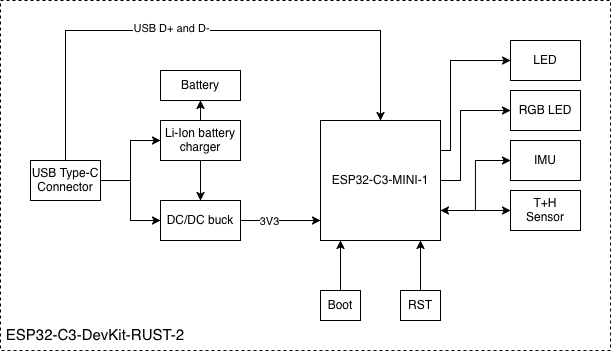
The block diagram provided illustrates the interaction between the power supply, the USB-to-UART bridge, and the main module. Keeping this flow in mind—specifically how the D+/D- signals route through the circuitry to the ESP32-C3—will help you troubleshoot connection issues effectively. Whether you are debugging signal integrity on the USB lines or probing the GPIOs with a logic analyzer, understanding the ESP32-C3-DevKit-RUST-2 Pinout and its internal signal path is the mark of an expert developer.
7. References & Legal Notice
This technical manual is developed based on the official documentation provided by Espressif Systems. We highly recommend referring to the primary source for the most recent updates regarding hardware revisions and detailed specifications.
Disclaimer: ESP32 and ESP32-S2 are registered trademarks of Espressif Systems (Shanghai) Co., Ltd. This guide is an independent technical review and is not an official publication of Espressif Systems.