
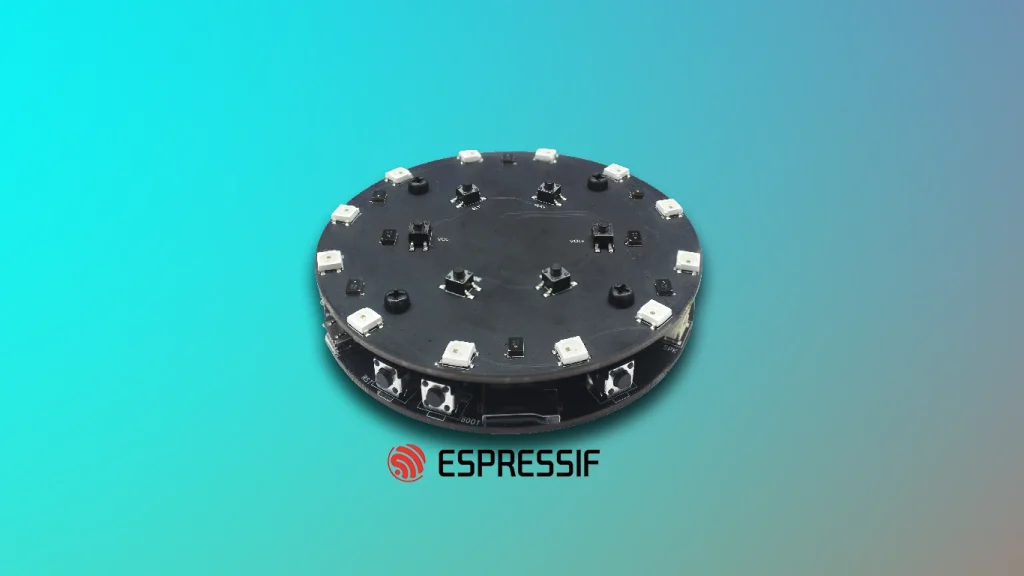
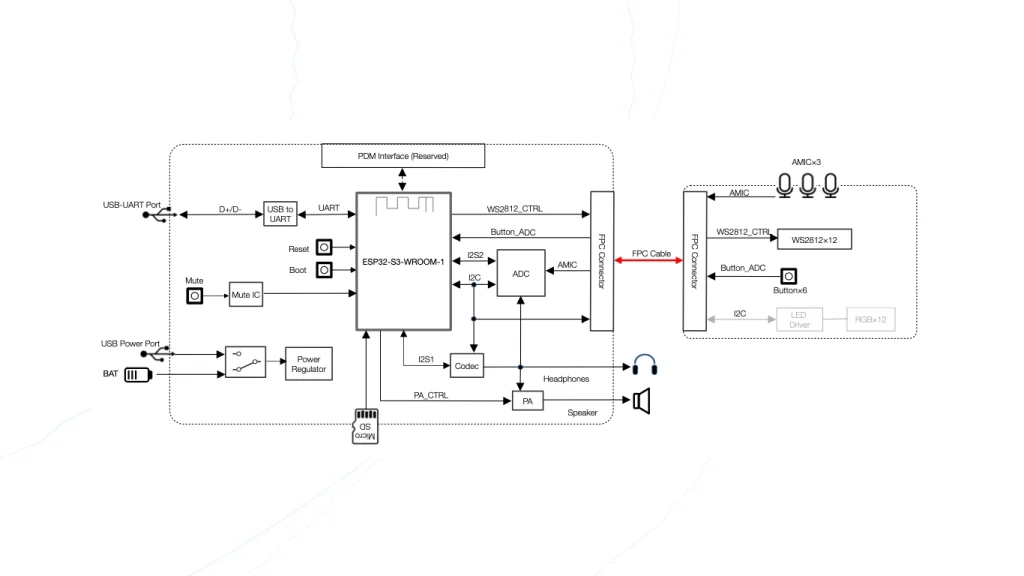
The ESP32-S3-Korvo-1 is a high-performance AI development board designed by Espressif Systems, specifically engineered for voice recognition and speech-to-text applications. At its heart lies the ESP32-S3 series SoC, a powerful dual-core XTensa LX7 processor capable of running at 240 MHz. This chip is not merely a generic microcontroller; it integrates specialized instructions for acceleration in artificial intelligence workloads and digital signal processing. When we discuss the ESP32-S3-Korvo-1 Pinout, we are looking at a complex ecosystem of audio front-end components, including microphone arrays, speaker power amplifiers, and dedicated hardware for wake-word detection.
Understanding the distinction between the SoC series and the specific module used on this board is critical for hardware engineering. While the series is the «ESP32-S3,» the physical module—often the ESP32-S3-WROOM series—integrates the silicon die with specific configurations of Flash and PSRAM. These variants determine how much memory is available for buffering audio streams or storing local neural network models. The Korvo-1 utilizes the S3’s native USB-OTG and dual-core capabilities to manage both the communication stack and the intensive audio processing algorithms simultaneously without significant latency.
1. Power Infrastructure and Electrical Logic
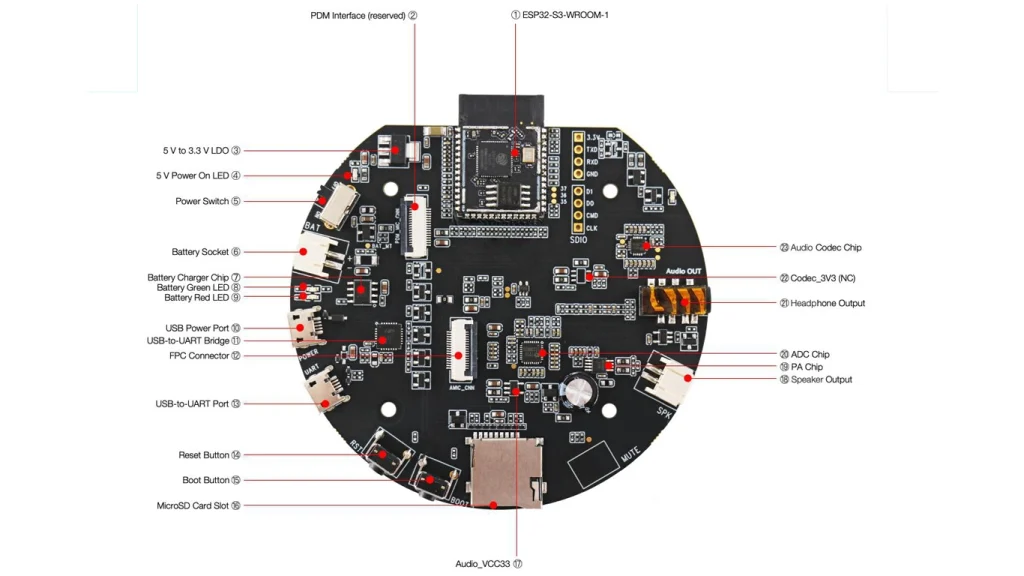
Providing a stable power supply is the cornerstone of any embedded system, especially one involving sensitive analog-to-digital conversions for audio. The ESP32-S3-Korvo-1 offers two primary paths for electrification: the USB Power Port and an external battery interface via a 2-pin connector. The internal power management circuitry is designed to handle the transition between these sources, ensuring that the ESP32-S3-WROOM module receives a clean, regulated voltage.
The board features a sophisticated distribution network where the 5V input from the USB port is stepped down to 3.3V to power the logic of the SoC. However, the audio power amplifier (PA) often requires a higher voltage or a more robust current source to drive external speakers without causing voltage sags that could reset the processor. When analyzing the ESP32-S3-Korvo-1 Pinout, it is vital to recognize that the power rails are subdivided to isolate digital noise from the analog audio paths, a common practice in high-fidelity voice interface designs.
Warning: Powering the board simultaneously through the USB Power Port and the external battery connector is possible, but users must ensure their battery charging circuitry and protection boards are compatible with the board’s internal charging logic to prevent thermal runaway or damage to the LDO regulators.
2. Detailed Hardware Reference: The ESP32-S3-Korvo-1 Pinout
The following table provides an exhaustive breakdown of the connectivity options available on the development board. In high-density hardware design, every pin serves a specific purpose, ranging from general-purpose input/output (GPIO) to specialized communication protocols like I2C, SPI, and I2S for audio data.
| Pin # | Name | Type | Function |
| 1 | GND | P | Ground |
| 2 | 3V3 | P | 3.3V Power Supply Output |
| 3 | IO0 | I/O/P | Strapping Pin / Boot Mode Selection |
| 4 | IO1 | I/O | GPIO / ADC1_CH0 |
| 5 | IO2 | I/O | GPIO / ADC1_CH1 |
| 6 | IO3 | I/O | GPIO / ADC1_CH2 |
| 7 | IO4 | I/O | GPIO / ADC1_CH3 |
| 8 | IO5 | I/O | GPIO / ADC1_CH4 |
| 9 | IO6 | I/O | GPIO / ADC1_CH5 |
| 10 | IO7 | I/O | GPIO / ADC1_CH6 |
| 11 | IO8 | I/O | GPIO / ADC1_CH7 |
| 12 | IO9 | I/O | GPIO / ADC1_CH8 |
| 13 | IO10 | I/O | GPIO / ADC1_CH9 |
| 14 | IO11 | I/O | GPIO / ADC2_CH0 |
| 15 | IO12 | I/O | GPIO / ADC2_CH1 |
| 16 | IO13 | I/O | GPIO / ADC2_CH2 |
| 17 | IO14 | I/O | GPIO / ADC2_CH3 |
| 18 | IO15 | I/O | GPIO / ADC2_CH4 |
| 19 | IO16 | I/O | GPIO / ADC2_CH5 |
| 20 | IO17 | I/O | GPIO / ADC2_CH6 |
| 21 | IO18 | I/O | GPIO / ADC2_CH7 |
| 22 | IO19 | I/O | USB_D- / GPIO |
| 23 | IO20 | I/O | USB_D+ / GPIO |
| 24 | IO21 | I/O | GPIO / I2C SDA |
| 25 | IO26 | I/O | GPIO / I2S Speaker Output |
| 26 | IO27 | I/O | GPIO / I2S Microphone Input |
| 27 | IO28 | I/O | GPIO / I2S Microphone Input |
| 28 | IO29 | I/O | GPIO / I2S Microphone Input |
| 29 | IO30 | I/O | GPIO / I2S Microphone Input |
| 30 | IO31 | I/O | GPIO / I2S Clock |
| 31 | IO32 | I/O | GPIO / I2S Word Select |
| 32 | TXD0 | O | UART0 Transmit (Programming) |
| 33 | RXD0 | I | UART0 Receive (Programming) |
| 34 | EN | I | Chip Enable (Reset) |
| 35 | 5V | P | 5V Power Supply Input/Output |
3. Deep Dive: ADC Architecture and Signal Conversion
The Analog-to-Digital Converter (ADC) within the ESP32-S3-Korvo-1 is a crucial subsystem for interpreting the physical world. The S3 integrates two 12-bit SAR (Successive Approximation Register) ADCs. The SAR architecture works by conducting a binary search through all possible quantization levels before arriving at a digital representation of the analog voltage. This process is highly dependent on the reference voltage ($V_{ref}$), which on the ESP32-S3 is typically internal but can be calibrated for higher precision.
When utilizing the ESP32-S3-Korvo-1 Pinout for sensor integration, developers must account for the non-linearities at the lower and upper bounds of the voltage range (typically 0V to 3.1V). To achieve 12-bit resolution, the system samples the voltage and compares it against a DAC output, adjusting bit by bit. For audio applications, while the primary voice data often comes through digital I2S microphones, auxiliary sensors or battery monitoring rely heavily on these ADC channels.
4. UART: The Communication Bridge
The Universal Asynchronous Receiver-Transmitter (UART) remains the most reliable interface for debugging and flashing firmware. The Korvo-1 utilizes a USB-to-UART bridge to allow a standard PC to communicate with the SoC’s hardware serial port. This interface operates on a frame-based protocol where data bits, parity bits, and stop bits must be synchronized by a predefined baud rate—most commonly 115,200 bps for ESP32 devices.
The logic levels for UART on the ESP32-S3-Korvo-1 Pinout are strictly 3.3V. Connecting a 5V logic source directly to the RX/TX pins can cause permanent damage to the S3’s silicon. The synchronization happens via start bits that trigger the internal timers of the receiver, ensuring that even without a shared clock line, the two devices remain in phase during the data burst.
5. Thermal Management and the LDO Regulator
Low Dropout (LDO) regulators are used on the Korvo-1 to provide the stable 3.3V rail required by the ESP32-S3-WROOM module. Unlike switching regulators, LDOs are linear, meaning they dissipate excess voltage as heat. The formula for dissipated power is P = (V_in — V_out)*I _out. If the board is powered by a 5V USB source and the system draws 500mA during heavy Wi-Fi and voice processing tasks, the LDO must dissipate 0.85W of heat.
This thermal energy must be managed through the PCB’s copper layers. The Korvo-1 design includes thermal vias under the regulator and the SoC to move heat away from the components and into the larger ground planes. Without proper thermal management, the LDO could enter thermal shutdown, leading to intermittent brownouts or «ghost» resets that are difficult to debug.
6. Strapping Pins and Boot Logic
One of the most technical aspects of the ESP32-S3-Korvo-1 Pinout is the concept of «Strapping Pins.» During the initial power-up or a hardware reset (triggered by the EN pin), the ESP32-S3 samples the logic state of specific GPIOs—most notably GPIO0. These states determine the boot mode of the chip.
If GPIO0 is pulled LOW during reset, the chip enters «Download Mode,» allowing new firmware to be flashed over UART. If it is HIGH, it enters «Flash Boot Mode,» where it begins executing the program stored in the internal or external SPI flash memory. The Korvo-1 includes onboard circuitry to automate this process via the USB-to-UART bridge, but understanding these states is vital when designing custom daughterboards that might inadvertently pull these pins to an incorrect logic level.
7. Programming and Firmware Deployment
To begin application development on the Korvo-1, users must navigate the «Firmware Download Mode.» This is typically achieved by holding the Boot button, pressing and releasing the Reset (EN) button, and then releasing the Boot button. This sequence ensures the strapping pins are in the correct state for the ROM bootloader to accept data over the UART0 port.
The software stack, ESP-Skainet, leverages the ESP-IDF (Espressif IoT Development Framework). This environment provides the necessary drivers to interface with the audio codecs and microphones defined in the ESP32-S3-Korvo-1 Pinout. By utilizing the dual-core architecture, the SDK can assign wake-word detection to one core while the second core handles user application logic and Wi-Fi connectivity, ensuring no voice commands are missed due to CPU starvation.
8. References & Legal Notice
This technical manual is developed based on the official documentation provided by Espressif Systems. We highly recommend referring to the primary source for the most recent updates regarding hardware revisions and detailed specifications.
Disclaimer: ESP32 and ESP32-S2 are registered trademarks of Espressif Systems (Shanghai) Co., Ltd. This guide is an independent technical review and is not an official publication of Espressif Systems.